Cyclos on Google Cloud Platform
Cyclos on Google Cloud Platform Audio
Overview
The Cyclos module creates a complete, secure environment for hosting the Cyclos Banking System on Google Cloud. Cyclos is a payment and banking software for microfinance institutions, local banks, and complementary currency systems. This module takes the complexity out of deploying Cyclos by automating the setup of its web servers, database, and storage.
Key Benefits
- Serverless Scale: Deploys Cyclos on Google Cloud Run, allowing it to automatically scale up to handle high transaction volumes and scale down to zero when idle to save costs.
- Data Integrity: Uses a managed PostgreSQL database (Cloud SQL) to ensure your financial transaction data is secure, backed up, and highly available.
- Customizable Branding: Supports injection of custom configuration and branding settings, allowing you to tailor the Cyclos appearance to your organization's needs.
- Zero-Maintenance: Eliminates the need to patch or manage underlying servers.
Functionality
- Deploys the Cyclos application container.
- Connects to a secure Cloud SQL PostgreSQL database.
- Configures shared storage for application files (e.g., logos, documents).
- Sets up secure networking to protect the banking interface.
This document details the implementation of the Cyclos module, covering IAM, services, configurations, existing features, and potential enhancements.
1. IAM and Access Control
The module implements a least-privilege security model using distinct Service Accounts for runtime and deployment operations.
Service Accounts
- Cloud Run Service Account (
cloud_run_sa): The runtime identity for the Cyclos container.- Roles:
roles/secretmanager.secretAccessor: Granted access to the database password and sensitive environment variables.roles/storage.objectAdmin: Full control over application storage buckets (if configured).roles/storage.legacyBucketReader: Metadata access for buckets.
- Roles:
- Cloud Build Service Account (
cloud_build_sa): The identity for CI/CD and initialization operations.- Roles:
roles/run.developer: Permission to deploy new revisions to Cloud Run.roles/iam.serviceAccountUser: Permission to act as (impersonate) the Cloud Run service account during deployment.
- Roles:
Database Access
- Application Access: The Cyclos application connects to Cloud SQL using a dedicated
cyclosPostgreSQL user.- This user is created via an automated initialization job (
create-user). - It authenticates using a high-entropy random password generated by Terraform and stored in Secret Manager.
- This user is created via an automated initialization job (
- Initialization Access: The initialization jobs (
create-extensions,create-user) connect as thepostgres(root) user to perform privileged operations like creating the database schema and installing extensions.
Network Access
- Public Access: The Cloud Run service is configured with
roles/run.invokergranted toallUsers, making the application publicly accessible via its URL. - Private Access: The Cloud Run service uses a Serverless VPC Access Connector to communicate with private services (Cloud SQL, NFS) using internal IP addresses, ensuring this traffic never traverses the public internet.
2. Implemented Services
The solution orchestrates the following Google Cloud services:
- Google Cloud Run: Hosts the stateless Cyclos application container.
- Configured to use Session Affinity to support stateful user sessions (required since clustering is currently disabled).
- Google Cloud SQL (PostgreSQL): Fully managed relational database (PostgreSQL 15).
- Google Cloud Storage (GCS): Object storage available for backups or application assets.
- Google Secret Manager: Securely stores the database password (
db_password) and API keys. - Google Cloud Build: Orchestrates CI/CD pipelines and the one-off initialization jobs.
- VPC Networking: Provides the private network backbone.
- Artifact Registry: Stores the Docker container images.
- Filestore (NFS): An NFS server is provisioned and mounted to
/mntby default, though the application is not currently configured to use it (see Enhancements).
3. Service Configuration
Cloud Run Configuration
- Resources: Default allocation of 2 vCPUs and 4GB Memory.
- Scaling: Explicitly fixed to
min_instance_count = 1andmax_instance_count = 1.- Note: This indicates no auto-scaling is currently possible, likely to prevent data inconsistency issues since the application clustering is disabled.
- Probes:
- Startup Probe: TCP check on port
8080. Initial delay is 90s to allow for slow Java startup and schema validation. - Liveness Probe: HTTP GET request to
/api. Initial delay is 120s.
- Startup Probe: TCP check on port
- Connectivity: Uses
vpc_egress = PRIVATE_RANGES_ONLY(or configured setting) to route internal traffic through the VPC.
Cloud SQL Configuration
- Engine: PostgreSQL 15.
- Extensions: The module automatically installs a comprehensive set of extensions required by Cyclos:
pg_trgm(Text similarity)uuid-ossp(UUIDs)cube(Multidimensional cubes)earthdistance(Geospatial calculations)postgis(Advanced geospatial data)unaccent(Accent-insensitive search)
Application Configuration (cyclos.properties)
- Database Source: Configured to use
PGSimpleDataSourcewith TCP connectivity (no Unix sockets). - Schema Management:
cyclos.db.managed = trueallows Cyclos to automatically create and update its schema on startup. - Clustering:
cyclos.clusterHandler = none. The application runs in standalone mode. - File Storage:
cyclos.storedFileContentManager = db. All files (images, documents) are stored inside the database as BLOBs. - Search:
cyclos.searchHandler = db. Search indexing is performed within the database.
4. Existing Features
- Zero-Touch Initialization: The module features robust "init jobs" that run on apply:
- Extension Setup: Checks for and installs all required PostgreSQL extensions in the correct dependency order (e.g.,
cubebeforeearthdistance). - User Provisioning: Automatically creates the
cyclosDB user and grants specific permissions, ensuring the app doesn't run as root.
- Extension Setup: Checks for and installs all required PostgreSQL extensions in the correct dependency order (e.g.,
- Self-Healing: Kubernetes-style health probes ensure the container is restarted if the application hangs.
- Secure by Design: No secrets are hardcoded. Database credentials are generated dynamically and injected at runtime.
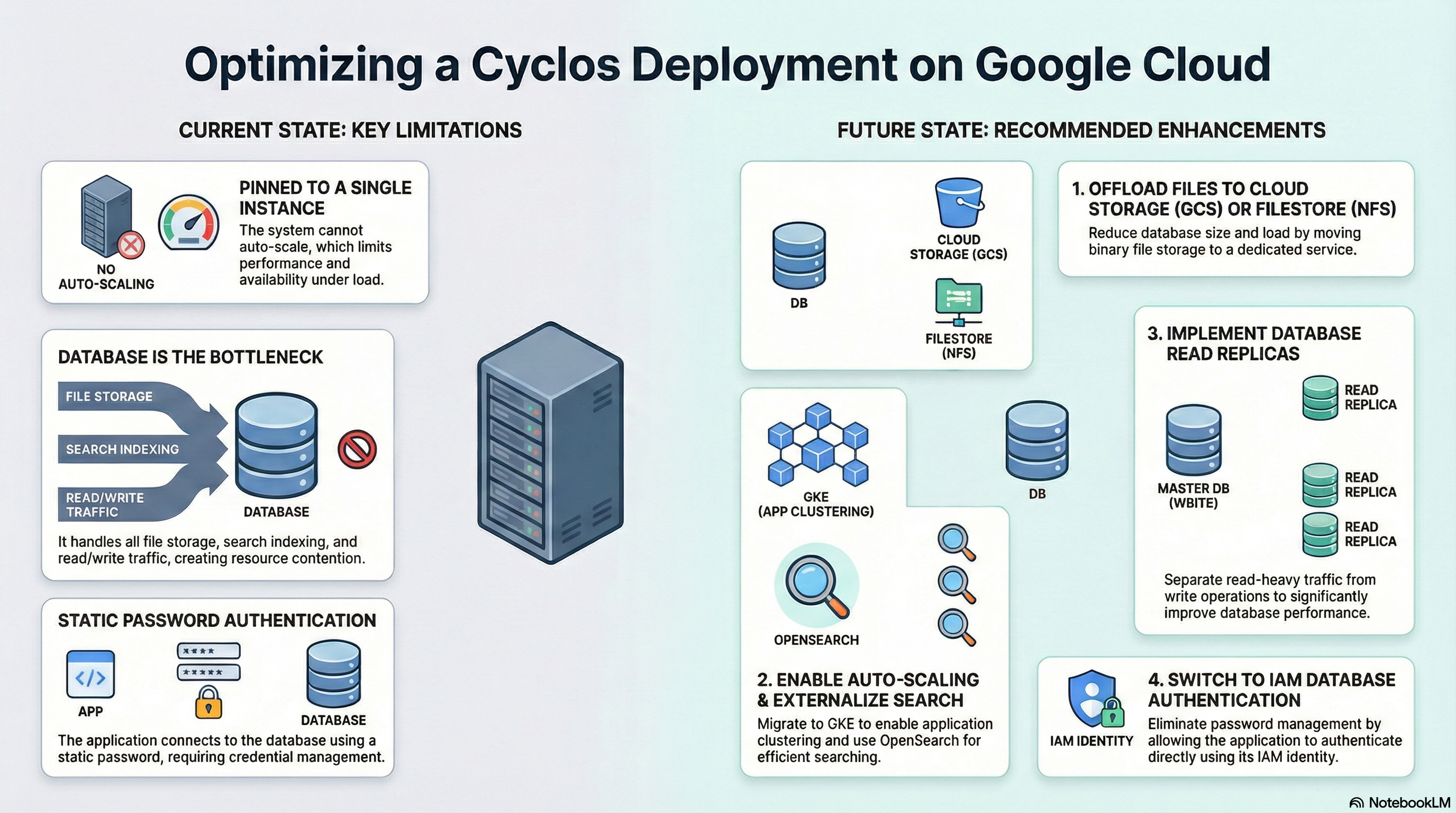
5. Potential Enhancements
To improve performance, scalability, and cost-efficiency, the following enhancements are recommended:
A. Offload File Storage to NFS or GCS
- Observation: Currently,
cyclos.storedFileContentManager = db. This increases database size, costs, and backup duration. - Recommendation:
- Use NFS: Since
/mntis already mounted, configurecyclos.storedFileContentManager = fileandcyclos.storedFileContentManager.rootDir = /mnt. - Use GCS: For better scalability, configure
cyclos.storedFileContentManager = gcsand provide the bucket name.
- Use NFS: Since
B. Enable Clustering & Auto-Scaling
- Observation: The service is pinned to 1 instance. Hazelcast requires a discovery mechanism (TCP/IP or K8s DNS).
- Recommendation: Migrate to GKE and enable Hazelcast clustering to allow multiple Cloud Run instances.
- Update
cyclos.properties:cyclos.clusterHandler = hazelcast.
- Update
C. Offload Search to OpenSearch
- Observation: Search runs on the DB, competing for resources.
- Recommendation: Provision an OpenSearch cluster and configure
cyclos.searchHandler = opensearch. This is critical for larger deployments.
D. Implement Read Replicas
- Observation: Single database instance for both reads and writes.
- Recommendation: Deploy Cloud SQL Read Replicas and configure
cyclos.datasource.readOnly.*properties to offload reporting and read-heavy traffic.
E. IAM Database Authentication
- Observation: Uses password authentication.
- Recommendation: Switch to IAM-based authentication. This removes the need for password rotation entirely, as the Cloud Run Service Account would authenticate directly with Cloud SQL using its IAM identity.