Wordpress on Google Cloud Platform
🎧
Wordpress on Google Cloud Platform Audio
Overview
The Wordpress module deploys the world's most popular Content Management System (CMS) on Google Cloud's modern serverless platform. It is perfect for corporate websites, blogs, and marketing landing pages that need to be fast, secure, and auto-scalable.
Key Benefits
- Traffic Spikes? No Problem: Automatically scales up to handle viral traffic or marketing campaigns, and scales down to save money when traffic is low.
- Fast Performance: Optimized environment for fast page load times, essential for SEO and user experience.
- Security: Removes the attack surface of traditional servers (no OS to patch).
- Media Management: Integrates with Cloud Storage to store unlimited images and media files.
Functionality
- Deploys WordPress container.
- Connects to a managed MySQL database.
- Configures a "Stateless" plugin mechanism (using Cloud Storage) so media uploads work across multiple server instances.
Executive Summary
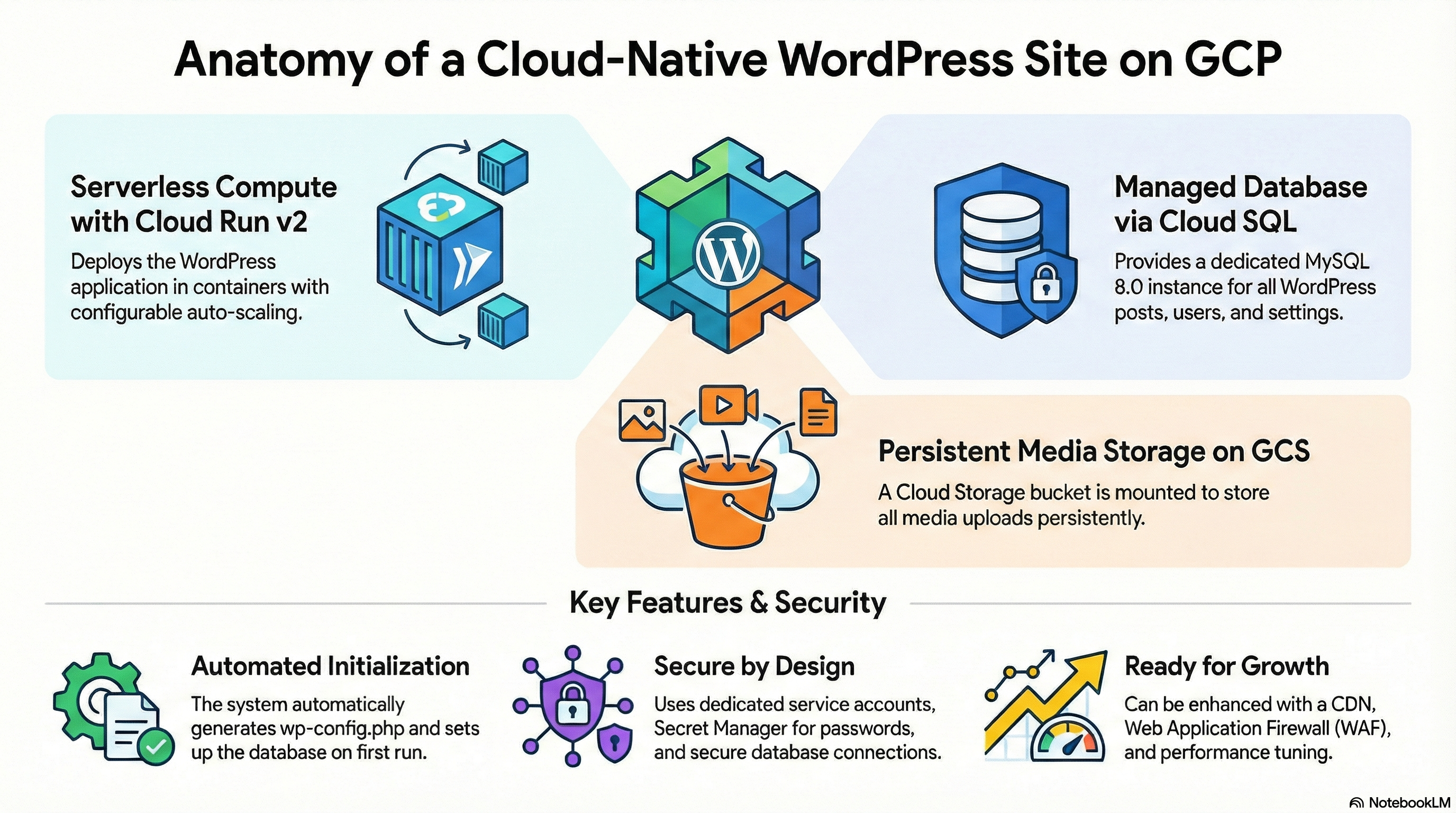
The Wordpress module deploys a scalable, containerized WordPress application on Google Cloud Run (v2), backed by Cloud SQL (MySQL 8.0) and Cloud Storage (GCS) for media assets. It leverages a wrapper architecture around the CloudRunApp module to inherit standardized infrastructure practices while defining application-specific configurations, such as custom Docker builds and initialization jobs.
1. Architecture & Services
Compute: Cloud Run (Gen 2)
- Service: Deploys a Cloud Run v2 service.
- Scaling: Configurable min/max instances (default 1-3).
- Execution Environment: Gen 2 (full Linux compatibility).
- Ingress: Configurable (public, internal, or load-balanced).
Database: Cloud SQL
- Engine: MySQL 8.0.
- Connection:
- Application: Connects via Unix socket (
/cloudsql/<instance>) mounted at/cloudsql. - Init Jobs: Connect via TCP (Private IP) to perform schema operations.
- Application: Connects via Unix socket (
- Provisioning: The module expects an existing Cloud SQL instance (likely provided by a platform module like
GCP_Services) and validates it via an external script (sql.tf). It does not provision the instance itself.
Storage: Google Cloud Storage (GCS)
- Media Assets: A GCS bucket (
wp-uploads) is mounted to/var/www/html/wp-contentvia GCS FUSE. - Behavior: This mount ensures uploads are persistent and shared across instances. The container entrypoint handles populating the bucket with initial theme/plugin data if empty.
CI/CD: Cloud Build
- Builds: Supports automated builds triggered by GitHub changes (
enable_cicd_trigger). - Image: Builds a custom image from
php:8.4-apache.
Secrets & Configuration
- Secret Manager: Stores sensitive data like
WORDPRESS_DB_PASSWORD. - Environment Variables: Injected into the container (e.g.,
WORDPRESS_DB_HOST,WORDPRESS_TABLE_PREFIX).
2. IAM & Access Control
Service Accounts
- Cloud Run SA: A dedicated Service Account is created for the application.
- Cloud Build SA: Used for CI/CD operations.
Roles & Permissions
The Cloud Run Service Account is granted:
- roles/secretmanager.secretAccessor: To access DB credentials and secret env vars.
- roles/storage.objectAdmin: Full control over the uploads bucket.
- roles/storage.legacyBucketReader: For bucket metadata access.
Network Security
- VPC Access: Direct VPC Egress is configured (
PRIVATE_RANGES_ONLYdefault) to allow connectivity to Cloud SQL and other internal resources. - Public Access: By default,
roles/run.invokeris granted toallUsers. This can be restricted viapublic_access = false.
3. Configuration Details
Container Configuration
- Base Image:
php:8.4-apache. - Extensions: Installs
gd,mysqli,imagick,bcmath,intl,zip. - Web Server: Apache configured with
mod_remoteipto correctly log client IPs behind the Cloud Run load balancer. - Entrypoint:
docker-entrypoint.shhandles:- Waiting for Cloud SQL socket.
- Generating
wp-config.phpwith unique salts. - Initializing
wp-contentdirectory structure on the GCS mount.
Application Configuration
- Variables: defined in
variables.tf. - Defaults:
memory_limit: 2Gi (container), 128M (PHP default, overrideable).timeout_seconds: 300s.
Initialization
- Job:
db-init(Alpine-based) runs on apply to create the database and user if they don't exist. - Dependency: Waits for the Cloud SQL instance to be available.
4. Existing Features
- Auto-Initialization: Automatically creates the database schema and populates the
wp-contentdirectory on first run. - Stateless/Stateful Hybrid: Uses Cloud Run (stateless) with GCS/SQL (stateful) for a true serverless architecture.
- Observability: Apache logs are directed to stdout/stderr (Cloud Logging).
- Security:
- Randomly generated salts for
wp-config.php. - Least-privilege IAM roles for storage and secrets.
- Cloud SQL Auth Proxy sidecar (integrated in Cloud Run) for secure DB access.
- Randomly generated salts for
5. Findings & Potential Enhancements
Enhancements
- PHP Tuning:
- Tune
opcachefurther based on load.
- Tune
- Email Delivery:
- Configure SMTP settings (e.g., SendGrid, Mailgun) via environment variables to ensure WordPress can send emails (currently relies on default PHP
mail(), which often fails in containers).
- Configure SMTP settings (e.g., SendGrid, Mailgun) via environment variables to ensure WordPress can send emails (currently relies on default PHP
- CDN Integration:
- Enable Cloud CDN on the Load Balancer (if using
internal-and-cloud-load-balancing) or configure a plugin to offload assets to a CDN.
- Enable Cloud CDN on the Load Balancer (if using
- WAF:
- Enable Cloud Armor for DDoS protection and WAF rules.