Django on Google Cloud Platform
Django on Google Cloud Platform Audio
Overview
The Django module is a rapid deployment accelerator for Python web applications. It provides a standardized, best-practice environment for hosting Django-based projects on Google Cloud. Whether you are building a CMS, a custom business app, or an API backend, this module gets you up and running in minutes.
Key Benefits
- Developer Friendly: Designed to work seamlessly with standard Django project structures.
- Production Ready: Includes setup for database connections, static file serving, and security settings out of the box.
- Cost Effective: Runs on Cloud Run, meaning you only pay for the exact compute time your application uses.
- Secure Defaults: Automatically handles secret management for database passwords and superuser credentials.
Functionality
- Deploys your Django application container to Cloud Run.
- Configures connection to a Cloud SQL (PostgreSQL) database.
- Sets up a "Superuser" account for immediate administrative access.
- Integrates with Google Cloud Monitoring for application health visibility.
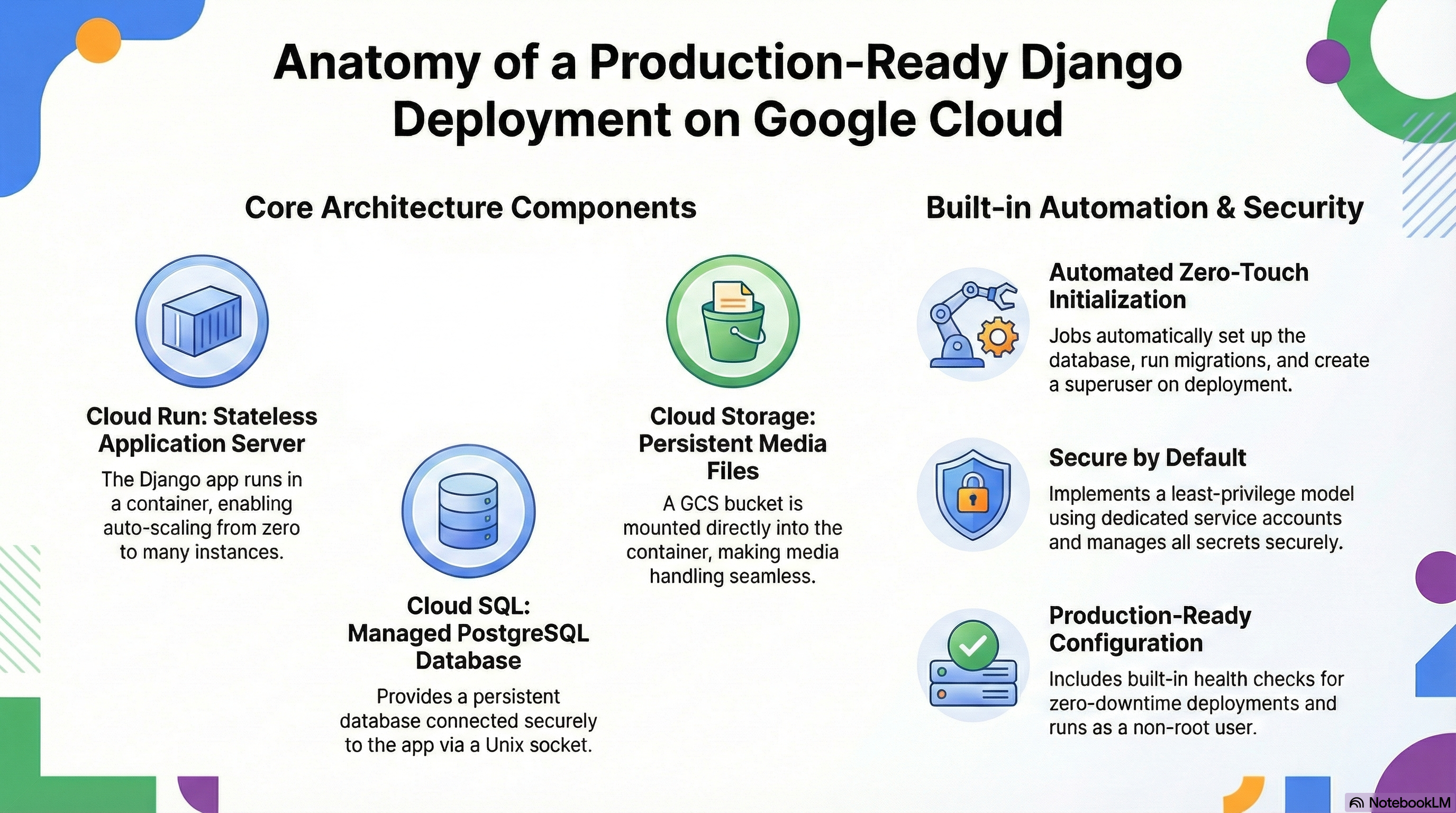
The Django module is a specialized wrapper around the platform's core CloudRunApp module. It is designed to deploy a production-ready Django application on Google Cloud Run, backed by Cloud SQL (PostgreSQL) and Cloud Storage (GCS) for media files. The architecture emphasizes statelessness for the application server while ensuring persistence for data and media through managed services.
2. IAM and Access Control Configuration
The module implements a least-privilege security model using dedicated Service Accounts (SA).
- Cloud Run Service Account: The primary identity for the Django application.
- Secret Accessor:
roles/secretmanager.secretAccessorgranted on specific secrets (Database Password, Django Secret Key, Environment Variable Secrets). - Storage Object Admin:
roles/storage.objectAdmingranted on the media bucket (*-django-media) to allow the application to read/write user-uploaded content. - Storage Legacy Bucket Reader:
roles/storage.legacyBucketReadergranted to allow GCS FUSE mounting ordjango-storagesmetadata access.
- Secret Accessor:
- Cloud Build Service Account:
- Service Account User: Can act as the Cloud Run SA to deploy services.
- Run Developer: Can deploy revisions to Cloud Run.
- Public Access:
- The Cloud Run service is configured with
roles/run.invokergranted toallUsersby default, making the application publicly accessible. This is controlled via theingress_settingsvariable.
- The Cloud Run service is configured with
3. Services Implemented & Configuration
A. Cloud Run (Application Server)
- Service Name: derived from
tenant_deployment_idandapp_name(e.g.,demo-django). - Container Image: Builds from
modules/Django/scripts/django/Dockerfileusingpython:3.11-slim. - Scaling: Configurable via
min_instance_count(default 0) andmax_instance_count(default 3). - Resources: Defaults to 1 CPU, 1Gi Memory (configurable).
- Probes:
- Startup Probe: HTTP GET
/health/(90s delay, prevents traffic until ready). - Liveness Probe: HTTP GET
/health/(checks if app is frozen).
- Startup Probe: HTTP GET
- Timeouts: Request timeout defaults to 300s (5 minutes).
B. Cloud SQL (Database)
- Engine: PostgreSQL 15 (defined in
django.tf). - Connection:
- The instance is mounted into the container at
/cloudsqlallowing Unix socket connections. django.tfinjectsDB_HOST(socket path or IP) andDB_ENGINE(django.db.backends.postgresql).- Extensions: The module explicitly requests extensions:
pg_trgm,unaccent,hstore,citext.
- The instance is mounted into the container at
- Initialization:
- A specialized
db-initCloud Run Job runs on apply. It checks for the DB, creates the role/user, creates the database, and grants privileges.
- A specialized
C. Cloud Storage (Media Persistence)
- Bucket: Creates a standard storage bucket suffixed with
django-media. - Mounting:
- Uses GCS FUSE to mount the bucket to
/app/mediainside the container. - The container user (
django) is explicitly created with UID2000to match the GCS FUSE user mapping, ensuring write permissions. - Mount options include
implicit-dirsto handle object-store directory simulation.
- Uses GCS FUSE to mount the bucket to
D. Secret Manager
- Managed Secrets:
- Database Password: Auto-generated and stored.
- Django Secret Key: Auto-generated (
random_passwordresource) and injected asSECRET_KEY. - Superuser Password: Can be retrieved from Secret Manager if configured.
E. Networking
- VPC Access:
- Can route traffic through a VPC (Connector or Direct VPC Egress) to access private resources like Cloud SQL (Private IP) or Memorystore.
- Controlled by
vpc_egress_setting(PRIVATE_RANGES_ONLYorALL_TRAFFIC).
- Ingress: Supports
all(Public),internal, orinternal-and-cloud-load-balancing(for use with Cloud Load Balancing).
4. Existing Features
- Automated Initialization:
- DB Setup: The
db-initjob handles idempotent database creation and user permissioning. - Migrations: The
migratejob runspython manage.py migrateandcollectstaticautomatically on deployment. - Superuser: The entrypoint script (
entrypoint.sh) checks forDJANGO_SUPERUSER_USERNAMEvariables and programmatically creates a superuser if it doesn't exist.
- DB Setup: The
- Health Checks: A generic
/health/endpoint is expected by the probe configuration to ensure zero-downtime deployments. - Security Defaults:
- Runs as non-root user (UID 2000).
DEBUGis forced toFalsein production configuration.ALLOWED_HOSTSis set to*(can be tightened via env vars).
- CI/CD Integration: Supports Cloud Build triggers linked to GitHub for automated builds and deployments.
5. Potential Enhancements
To further harden and improve the module, the following enhancements are recommended:
A. Performance & Caching
- CDN for Static Files: Currently,
collectstaticruns locally. For high traffic, configuringdjango-storagesto serve static files directly from GCS (public bucket) with Cloud CDN enabled would significantly reduce container load.
B. Security
- Cloud Armor WAF: If using a Load Balancer, attaching Cloud Armor policies to filter SQL injection and XSS attacks.
- Secret Rotation: Implement automatic rotation for the Database password using Secret Manager rotation schedules and Cloud Functions to update the Django service.
- Strict Allowed Hosts: Instead of
*, dynamic discovery of the Cloud Run URL to setALLOWED_HOSTSprecisely.
C. Observability
- Structured Logging: Ensure Django logs are formatted as JSON (using
structlogor similar) to fully leverage Cloud Logging's severity filtering and parsing. - Trace Integration: Add
opentelemetryinstrumentation to the container to trace requests across Cloud Run and Cloud SQL.
D. Operational
- Celery/Background Workers: Django often requires async tasks. The current module deploys the web server. An enhancement would be to add a flag
enable_worker = trueto deploy a second Cloud Run service (or sidecar) running the Celery worker process. - Cron Jobs: Use Cloud Scheduler to trigger Django management commands (e.g., clearing sessions, email queues) by hitting a protected HTTP endpoint or running a job.