OpenEMR on Google Cloud Platform
OpenEMR on Google Cloud Platform Audio
Overview
The OpenEMR module deploys a leading open-source electronic health records (EHR) and medical practice management solution. It is designed for healthcare providers who need a secure, HIPAA-compliant-ready environment to manage patient data, scheduling, and billing.
Key Benefits
- Patient Data Sovereignty: Keep full control and ownership of your patient records by hosting them on your own cloud instance.
- Secure & Compliant: Built on Google Cloud's secure foundation, with encrypted databases and private networking to help meet compliance requirements.
- High Availability: Ensures patient records are always accessible when needed by clinicians.
- Disaster Recovery: Integrated backup solutions to protect against data loss.
Functionality
- Deploys OpenEMR application.
- Configures a secure MySQL/MariaDB database.
- Sets up encrypted storage for patient documents and certificates.
- Automates certificate management (SSL) for secure web access.
This document provides an analysis of the OpenEMR module. It details the architecture, IAM configurations, service specifications, and available features, along with recommendations for enhancement.
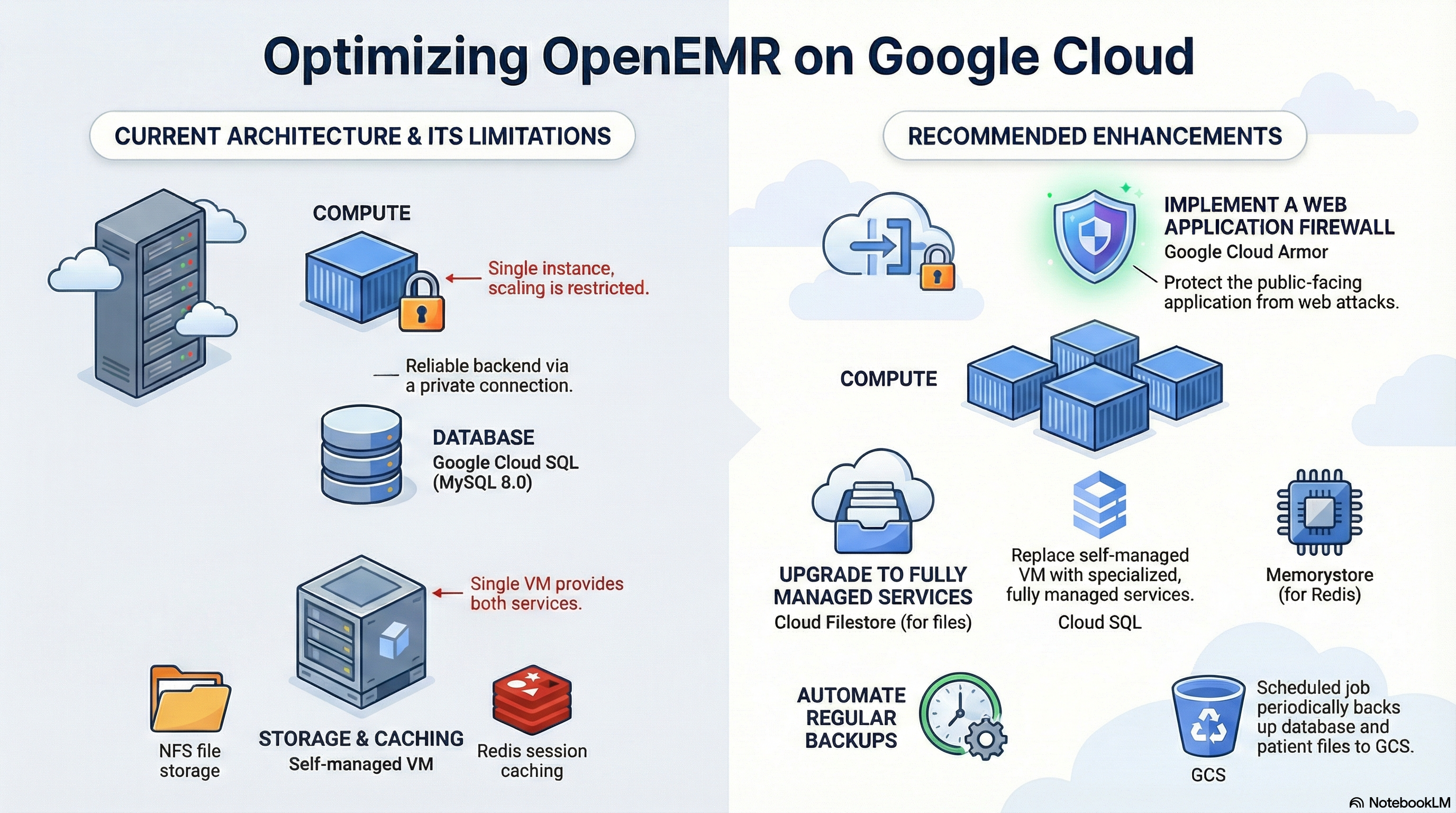
The OpenEMR module deploys a scalable, containerized instance of OpenEMR on Google Cloud Run. It utilizes a wrapper architecture (CloudRunApp) to provision standard infrastructure components while defining OpenEMR-specific configurations. Key architectural decisions include using Cloud SQL for the database, an external NFS server (GCE instance) for shared file storage (sites directory), and Redis for session management (hosted on the same NFS infrastructure).
2. Architecture Overview
The deployment follows a standard 3-tier web application architecture adapted for serverless containers:
- Compute: Google Cloud Run (Gen 2) hosting the OpenEMR PHP application (Apache/PHP-FPM).
- Database: Google Cloud SQL (MySQL 8.0) connected via Private IP or Unix Socket.
- Storage:
- Application Code: Immutable container image.
- Patient Documents/Sites: NFS Volume mounted to
/var/www/localhost/htdocs/openemr/sites. This is provided by a GCE instance running an NFS server.
- Caching/Sessions: Redis, accessed via the internal IP of the NFS infrastructure.
- Networking: Private VPC connectivity via Direct VPC Egress. Public or Internal Ingress.
3. IAM & Access Control
The module implements the Principle of Least Privilege through dedicated Service Accounts (SA).
Service Accounts
- Cloud Run Service Account (
cloudrun-sa):- Identity: Used by the OpenEMR container at runtime.
- Permissions:
roles/secretmanager.secretAccessor: To retrieveOE_PASS(Admin Password) andDB_PASSWORD.roles/storage.objectAdmin: Full control over creating/managing GCS buckets (ifcreate_cloud_storageis true).roles/storage.legacyBucketReader: For listing bucket metadata.
- Cloud Build Service Account (
cloudbuild-sa) (If CI/CD is enabled):- Identity: Used by Cloud Build triggers.
- Permissions:
roles/run.developer: To deploy revisions to Cloud Run.roles/iam.serviceAccountUser: To act as the Cloud Run SA during deployment.roles/secretmanager.secretAccessor: To access the GitHub token.
Network Access
- Cloud Run Invoker: By default,
roles/run.invokeris granted toallUsers, making the service publicly accessible. This is controlled by thepublic_accessvariable but the implementation inservice.tfcurrently defaults toallUsersifconfigure_environmentis true.
4. Service Configuration
Compute: Cloud Run
- Image Source: Custom build based on
alpine:3.20with PHP 8.3 and Apache. - Resources:
- CPU:
2000m(2 vCPU) default. - Memory:
4Gidefault.
- CPU:
- Scaling:
- Min Instances:
1(Ensures warm start, prevents cold boot latency). - Max Instances:
1(Restricted to 1 by default inopenemr.tf, likely due to legacy concurrency concerns or session stickiness, though Redis is configured).
- Min Instances:
- Probes:
- Startup Probe: TCP check on port 80. Initial delay 240s.
- Liveness Probe: HTTP GET on
/interface/login/login.php. Initial delay 300s.
Database: Cloud SQL
- Engine: MySQL 8.0.
- Connection:
- Primary: Unix Socket (mounted at
/cloudsql). - Secondary: Internal IP (
DB_HOSTenv var). - Credentials: Rotated automatically via Secret Manager (
google_secret_manager_secret).
- Primary: Unix Socket (mounted at
Storage: NFS & Volumes
- Mount Point:
/var/www/localhost/htdocs/openemr/sites. - Source: External GCE Instance (identified via
get-nfsserver-info.shscript). - Permissions: The startup script (
openemr.sh) intentionally skips recursivechownon this directory to prevent Cloud Run startup timeouts, relying on thenfs-initjob instead.
Configuration Options (Variables)
| Variable | Default | Description |
|---|---|---|
nfs_enabled | true | Critical for OpenEMR. Enables the NFS volume mount. |
database_type | MYSQL_8_0 | Required version for OpenEMR compatibility. |
environment_variables | Map | Includes PHP_MEMORY_LIMIT (512M), SMTP_* settings. |
ingress_settings | all | Controls visibility (all, internal, internal-and-cloud-load-balancing). |
vpc_egress_setting | PRIVATE_RANGES_ONLY | Routes private traffic to VPC, public to internet. |
backup_source | gcs | Source for automated backup restoration during init (gcs or gdrive). |
5. Application Implementation
Docker Container (scripts/openemr/Dockerfile)
- Base:
alpine:3.20. - Software: Apache2, PHP 8.3 (with FPM), Node.js (for build assets).
- Build Process: Clones OpenEMR
rel-704from GitHub, runscomposerandnpmbuilds, and compiles assets. - Security: Runs Apache/PHP as user
apache(UID 1000). - Logging: Redirects Apache/PHP logs to
/dev/stderrand/dev/stdoutfor Cloud Logging compatibility.
Startup Logic (scripts/openemr/openemr.sh)
- Auto-Configuration: Runs
auto_configure.phpto set upsqlconf.phpif missing. - Resiliency: Detects "Cloud Run mode" to skip slow filesystem permission checks (
find/chown) on the NFS mount. - Session Handling: Configures
session.save_handler = redisifREDIS_SERVERis present. - Port Binding: Dynamically updates Apache's
Listenport based on the$PORTenvironment variable.
Initialization Jobs (nfs-init)
- Purpose: Prepares the shared storage before the app starts.
- Actions:
- Sets ownership of the
sitesdirectory to UID 1000. - Downloads a backup file (if
BACKUP_FILEIDis provided) from GCS or GDrive. - Unzips and restores the backup to the NFS volume.
- Regenerates
sqlconf.phpwith the current DB credentials.
- Sets ownership of the
6. Potential Enhancements
Infrastructure & Architecture
- Separate Redis Service: Migrating to Cloud Memorystore for Redis would improve reliability, manageability, and scalability.
- Managed NFS (Filestore): Replacing the GCE-based NFS server with Cloud Filestore (Basic Tier) would remove the burden of managing the storage VM and improve availability.
- WAF / Cloud Armor: If
ingress_settingsisall, the service is exposed directly. Implementing a Global Load Balancer with Cloud Armor is recommended to protect against OWASP Top 10 attacks.
Security
- IAP Integration: Restrict public access by enabling Identity-Aware Proxy (IAP) on the Load Balancer, ensuring only authorized users can reach the login screen.
- Secret Rotation: Implement a dedicated job or function to rotate the
OE_PASSandDB_PASSWORDperiodically and update the OpenEMR config, as currently they are static after creation. - Least Privilege Refinement: Review
roles/storage.objectAdmin. If the app only needs to write documents,roles/storage.objectCreatorandroles/storage.objectViewermight be sufficient.
Observability & Operations
- Structured Logging: Ensure
openemr.confLogFormat explicitly uses JSON or GCP-compatible text formats for easier parsing in Cloud Logging. - Automated Backups: The current solution supports restore-on-init. A
CronJob(Cloud Scheduler + Cloud Run Job) should be added to periodically dump the MySQL database andsitesdirectory to GCS. - Health Check Tuning: The
startup_probedelay (240s) is quite long. Optimizing the PHP-FPM startup orauto_configureprocess could reduce deployment roll-out times.