Ghost on Google Cloud Platform
Ghost on Google Cloud Platform Audio
Overview
The Ghost module deploys the Ghost publishing platform on Google Cloud. Ghost is a powerful app for professional publishers to create, share, and grow a business around their content.
Key Benefits
- Professional Publishing: Built for journalism and newsletters, offering a clean writing experience and native membership features.
- High Performance: Runs on a modern Node.js stack, optimized for speed and SEO.
- Maintenance Free: Serverless deployment removes the need for OS patching or server management.
- Scalable: Handles traffic spikes from viral posts automatically via Cloud Run.
Functionality
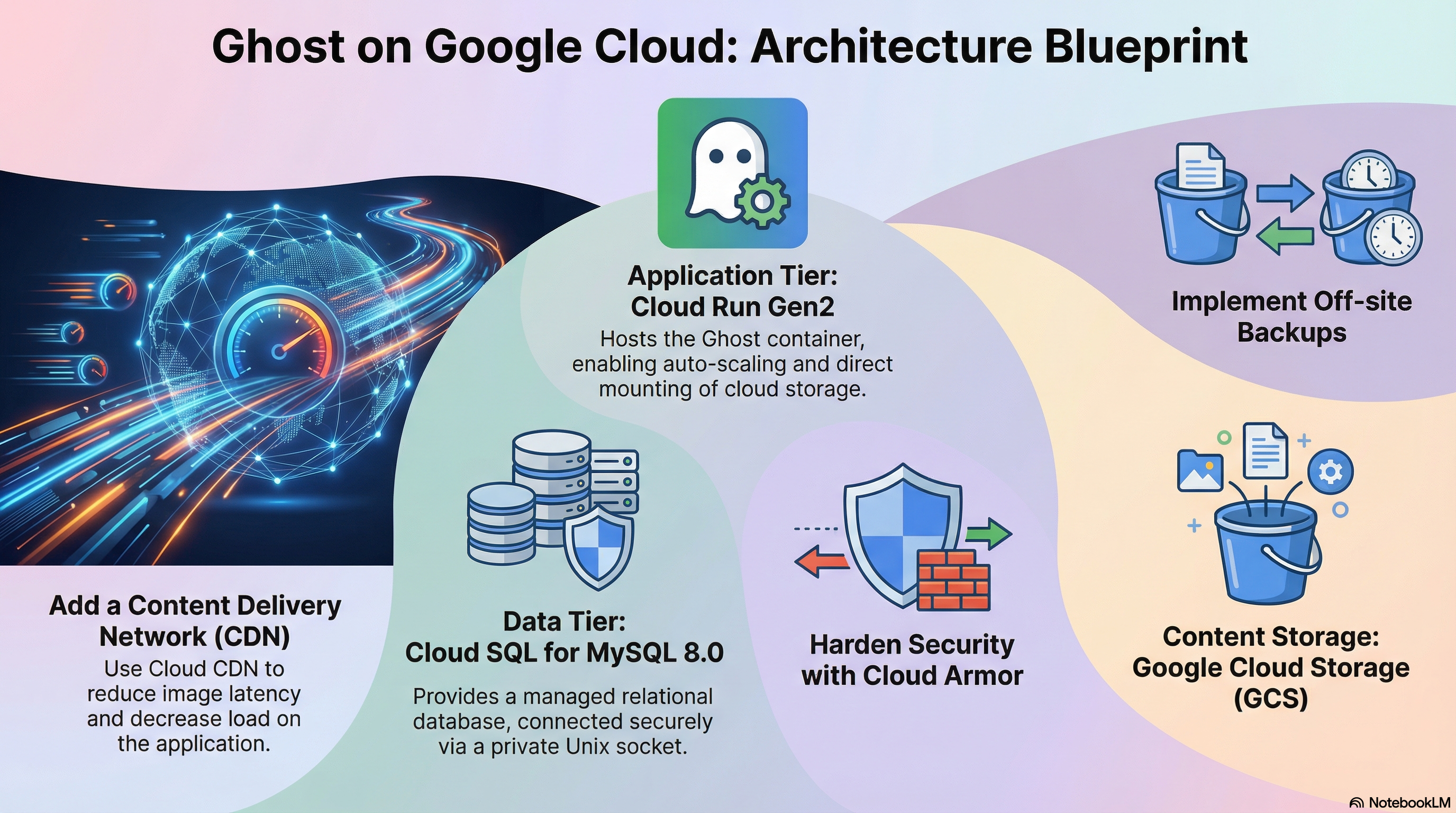
- Deploys the Ghost container (Gen2 execution environment).
- Connects to a managed Cloud SQL (MySQL 8.0) database.
- Persists media and themes to Cloud Storage (GCS) via FUSE mount.
- Configures privacy and caching settings optimized for production.
This document provides a comprehensive overview of the modules/Ghost implementation, covering its architecture, IAM and access control, service configuration, and potential enhancements.
1. Technical Overview
The Ghost module leverages a Wrapper Module Architecture. It acts as a specialized configuration layer around a shared foundation (CloudRunApp module), inheriting robust infrastructure logic while injecting Ghost-specific requirements.
- Architecture: Symlinked Terraform files (
service.tf,iam.tf, etc.) reuse core platform logic, whileghost.tfprovides the specific application definition. - Runtime: Runs on Cloud Run (Gen2) using a custom container image based on
ghost:6.14.0. - Data Layer: Cloud SQL (MySQL 8.0) for relational data and Cloud Storage (GCS) for persistent content (images/media).
2. IAM and Access Control
The module implements a least-privilege security model using specific Service Accounts (SAs) for different lifecycle stages.
Service Accounts
-
Cloud Run Service Account (
cloud_run_sa):- Identity: Runs the actual Ghost application.
- Roles:
roles/secretmanager.secretAccessor: Access toDB_PASSWORD,ROOT_PASSWORD, and other secret env vars.roles/storage.objectAdmin: Full control over theghost-contentbucket to upload/serve images.roles/storage.legacyBucketReader: For listing bucket metadata.
- Implementation: Defined in
iam.tfviagoogle_storage_bucket_iam_memberandgoogle_secret_manager_secret_iam_member.
-
Cloud Build Service Account (
cloud_build_sa):- Identity: Executes the container build and deployment pipelines.
- Roles:
roles/run.developer: Permission to deploy revisions to Cloud Run.roles/iam.serviceAccountUser: Permission to "act as" the Cloud Run SA during deployment.- Secret Access: Access to GitHub tokens for CI/CD integration.
Database Access
- Authentication: The Ghost application connects to Cloud SQL using MySQL Native Password or Caching SHA2 Password (Ghost 6.x requirement).
- User: A dedicated database user (default
ghost) is created via thedb-initinitialization job. - Privileges: The
db-initjob grantsCREATE,ALTER,DROP,INDEX, andREFERENCESon the specificghostdatabase.
3. Service Implementation & Configuration
The module orchestrates the following Google Cloud services:
A. Cloud Run (The Application)
- Resource:
google_cloud_run_v2_service(inservice.tf). - Configuration:
- CPU/Memory: 2 vCPU, 4GiB Memory (Optimized for Ghost 6.x).
- Execution Environment:
gen2(Required for GCS FUSE volume mounts). - Scaling: Configurable via
min_instance_countandmax_instance_count. - Ingress: configurable via
ingress_settings(Public, Internal, or Load Balancer).
- Probes:
- Startup Probe: 90s initial delay (Ghost 6.x takes time to initialize/migrate).
- Liveness & Readiness Probes: configured on path
/(Ghost API root).
B. Cloud SQL (The Database)
- Discovery: The module does not create the instance but discovers an existing one (via
sql.tfandscripts/core/get-sqlserver-info.sh). - Connection:
- Uses Cloud Run Volume Mounts (
/cloudsql) to expose the Unix socket. ghost.tfforcesdatabase_type = "MYSQL_8_0".
- Uses Cloud Run Volume Mounts (
- Initialization: An
initialization_job(db-init) runs a container (mysql:8.0-debian) to verify connectivity, create the DB, and configure the user.
C. Cloud Storage (The Content)
- Usage: Stores uploaded images, themes, and media.
- Mounting: Uses Cloud Storage FUSE (Cloud Run Gen2 feature). The bucket is mounted directly to
/var/lib/ghost/contentinside the container. - Versioning: Disabled by default in
ghost.tf(versioning_enabled = false), but the resource supports it.
D. Networking
- VPC Access: Connects to the "vpc-network" to reach the Private IP of Cloud SQL and other internal services.
- Egress: Defaults to
PRIVATE_RANGES_ONLY(split-tunneling), allowing public traffic (like calling the Ghost update server) to go directly to the internet.
4. Configuration Deep Dive
Dockerfile & Entrypoint (scripts/ghost/)
- Base Image:
ghost:6.14.0. - Custom Entrypoint (
entrypoint.sh):- Auto-Discovery: Dynamically queries the Google Metadata Server and Cloud Run API to find its own public URL if the
urlenvironment variable is not set. - Wait Strategy: Checks TCP connectivity to the database host before starting Ghost.
- Fallback: Defaults to
localhost:2368for development.
- Auto-Discovery: Dynamically queries the Google Metadata Server and Cloud Run API to find its own public URL if the
Environment Variables (ghost.tf)
Ghost is heavily parameterized via env vars:
database__client:mysql.database__connection__socketPath:/cloudsql/...(for socket connection).logging__transports:["stdout"](Forces logs to Cloud Logging).privacy__useUpdateCheck:false(Privacy hardening).caching__*: Optimized cache TTLs for Ghost 6.x.
5. Potential Enhancements
To further harden and improve the deployment, consider the following enhancements:
1. Content Delivery Network (CDN)
- Current State: Images are served directly from Cloud Run (via the GCS mount).
- Enhancement: Deploy Cloud CDN (via a Global Load Balancer) in front of Cloud Run.
- Benefit: dramatically reduces latency for images and reduces Cloud Run instance CPU usage (handling static assets).
2. Email Service Integration (Mailgun)
- Current State: Supports generic SMTP env vars (
SMTP_HOST, etc.). - Enhancement: Add explicit support/variables for Mailgun API configuration. Ghost strongly recommends Mailgun for bulk newsletters over generic SMTP.
- Add variables:
mail__transport="mailgun",mail__options__auth__api_key,mail__options__domain.
- Add variables:
3. Off-site Backups
- Current State: Cloud SQL has automated backups. GCS bucket has no native backup configured in the module.
- Enhancement:
- Enable Object Versioning on the
ghost-contentbucket. - Implement a cron job (Cloud Scheduler) to sync the GCS bucket to a "Coldline" archive bucket in a different region for disaster recovery.
- Enable Object Versioning on the
4. Observability & Logging
- Current State: Logs to stdout.
- Enhancement:
- JSON formatted logs: Configure Ghost to output JSON logs.
- Cloud Monitoring Dashboard: Add a dashboard for Ghost metrics.
5. Security Hardening
- Current State: Public access enabled.
- Enhancement:
- Cloud Armor: Attach a security policy to the Load Balancer.
- Identity-Aware Proxy (IAP): Use IAP for internal access.