Odoo on Google Cloud Platform
Odoo on Google Cloud Platform Audio
Overview
The Odoo module deploys a comprehensive Enterprise Resource Planning (ERP) suite. Odoo offers a single platform for CRM, Accounting, Inventory, Manufacturing, eCommerce, and more. This module provides a turnkey solution to host Odoo Enterprise or Community on Google Cloud, ensuring it is secure, backed up, and scalable.
Key Benefits
- All-in-One Business Management: Consolidate your fragmented software tools into one unified platform.
- Enterprise Reliability: Deployed on Google's high-reliability infrastructure with automated daily backups.
- Secure Access: Protect your business data with enterprise-grade security, firewalls, and private database connections.
- Customizable: Ready for custom add-ons and modules to fit your specific business processes.
Functionality
- Deploys the Odoo application server.
- Provisions a dedicated PostgreSQL database.
- Sets up a persistent filestore for attachments and session data.
- Configures automated backups to protect against data loss.
This analysis details the implementation of the Odoo module, covering architecture, IAM, services, configuration, features, and the implemented enhancements.
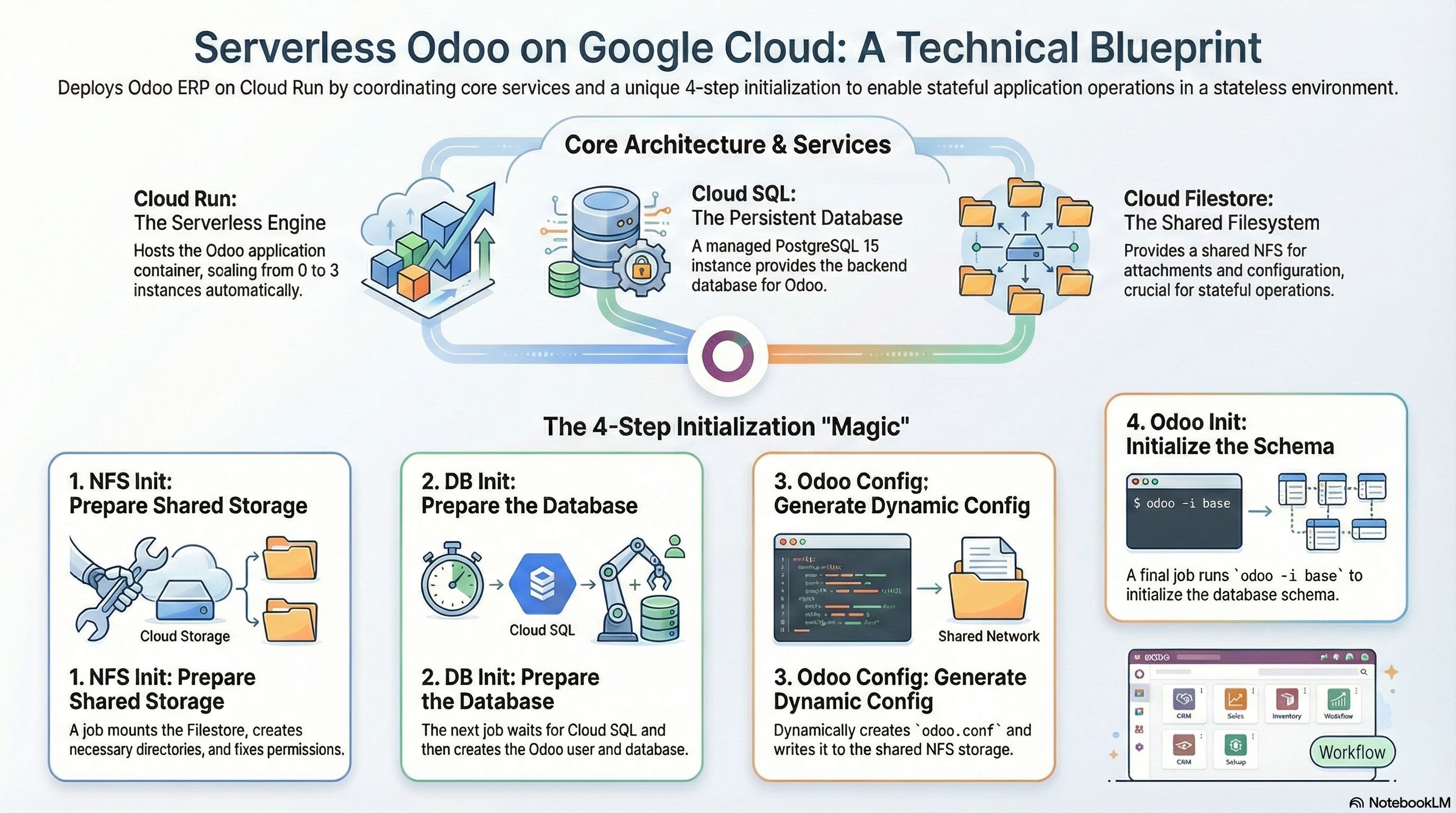
The modules/Odoo module is a wrapper deployment that leverages the modules/CloudRunApp foundation to deploy Odoo Community Edition on Google Cloud Run. It utilizes a Serverless architecture backed by Cloud SQL (PostgreSQL) and Cloud Filestore (NFS) for persistence.
A key implementation detail is its reliance on a 4-step Cloud Run Job initialization sequence to prepare the environment (NFS, DB, Config) before the main application starts, ensuring stateless containers can operate a stateful ERP system effectively.
2. Services & Architecture
The solution uses the following Google Cloud services:
-
Cloud Run (Gen 2):
- Service: Hosting the Odoo application container.
- Jobs: 4 lifecycle jobs for initialization (
nfs-init,db-init,odoo-config,odoo-init). - Resources: Default configuration is 2 vCPU / 4Gi Memory.
- Scaling: Configured for 0-3 instances (scale-to-zero enabled).
- Networking: Direct VPC Egress enabled to access Cloud SQL and Filestore internal IPs.
- Concurrency: Configured with
workers = 0(Threaded Mode) to ensure single-port (8069) compatibility, handling both XML-RPC and Longpolling on the same port.
-
Cloud SQL:
- Engine: PostgreSQL 15.
- Connection: Unix Socket via Cloud Run Volume mount (
/cloudsql). - Discovery: The module uses an external script to discover an existing SQL instance.
-
Cloud Filestore (NFS):
- Criticality: High. Odoo requires a shared filesystem for
filestore(attachments) andsessions(if not using Redis) when running multiple replicas. - Mount Point:
/mnt(mapped to/var/lib/odoopaths via config).
- Criticality: High. Odoo requires a shared filesystem for
-
Redis (Enhanced):
- Integration: Optional support for Redis.
- Configuration: Can use the shared Internal Redis (from
GCP_Services) or a custom host. - Usage: Configured in
odoo.confviaredis_hostandredis_portparameters if enabled. - Logic: If
enable_redisis true andredis_hostis unset, it automatically defaults to the NFS server's internal IP (assuming a co-located Redis/NFS setup).
3. IAM and Access Control
Access control is managed via Service Accounts (SA) with Least Privilege principles.
Service Accounts
- Cloud Run Service Account: The identity under which the Odoo container runs.
- Cloud Build Service Account: Used for CI/CD and deployment.
Roles & Permissions
The Cloud Run Service Account is granted:
roles/cloudsql.client: Implicitly granted/required to connect to the Cloud SQL instance.roles/secretmanager.secretAccessor:ODOO_MASTER_PASS: The admin password for Odoo.DB_PASSWORD: Database connection credentials.
roles/storage.objectAdmin: Full control over the configured storage buckets.roles/storage.legacyBucketReader: For listing bucket metadata.
4. Configuration Analysis
Initialization Logic (The "Magic")
The module executes 4 sequential Cloud Run Jobs:
nfs-init: Mounts Filestore, creates directories, and fixes permissions.db-init: Waits for Cloud SQL, creates theodoouser and database.odoo-config:- Dynamically generates
odoo.confbased on environment variables. - Injects Redis configuration if enabled.
- Sets
workers = 0for Cloud Run stability. - Writes the config file to the NFS share (
/mnt/odoo.conf).
- Dynamically generates
odoo-init: Runsodoo -i baseto initialize the database schema.
Runtime Configuration (odoo.tf)
The Cloud Run service overrides the container's default command:
- Command:
/bin/bash -c - Args: Checks for
/mnt/odoo.confand executesodoo -c /mnt/odoo.conf.
Container Image (Custom Build)
- Source:
image_source = "custom"(Builds fromscripts/odoo/Dockerfile). - Base:
ubuntu:noble(24.04). - Odoo Version: Defaults to 18.0 (Stable), configurable via Terraform variable
application_version. - Enhancements:
- Includes
python3-redisfor Redis support. - Includes
wkhtmltopdf(patched). - Flexible SHA verification for nightly builds.
- Includes