GCP Services on Google Cloud Platform
GCP Services Module Deep Dive Analysis Audio
Overview
The GCP Services module acts as the foundation builder for your applications. Once your project is created, this module lays down the necessary infrastructure "plumbing"—networks, databases, and shared storage—that your applications need to run. It ensures that all services are connected securely and efficiently.
Key Benefits
- Plug-and-Play Infrastructure: Deploys a production-ready network and database layer that other application modules can simply "plug into."
- Hybrid Storage Options: Provides both structured data storage (Databases) and file storage (NFS) to support a wide range of legacy and modern applications.
- Flexible Database Choices: Choose between PostgreSQL or MySQL based on your application's requirements.
- Advanced Compute Options: Optionally enables Google Kubernetes Engine (GKE) for complex, container-orchestrated workloads.
Functionality
- Provisions a Virtual Private Cloud (VPC) network.
- Deploys managed Cloud SQL instances (Postgres or MySQL).
- Sets up a Network File System (NFS) server for shared file access across applications.
- Optionally creates a GKE cluster with enterprise features like Policy Controller and Service Mesh.
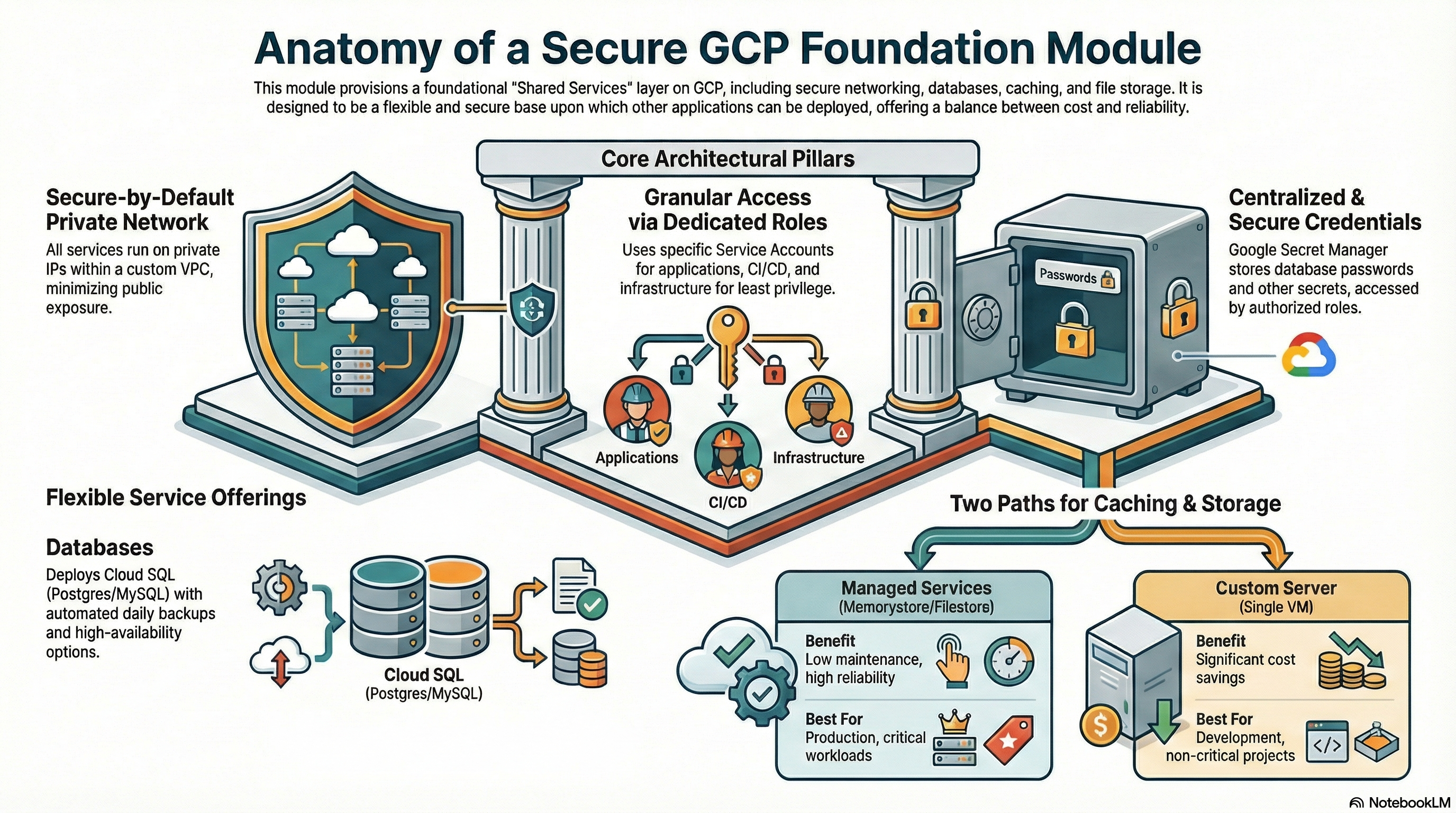
The GCP_Services module serves as the foundational infrastructure layer for the platform. It is designed to provision a shared environment that hosts core networking, database, caching, and file storage services. This module effectively acts as a "Shared Services" or "Foundation" layer upon which application modules (like CloudRunApp) depend.
It offers flexibility through toggleable features (managed vs. custom services) to balance cost (for development) and reliability (for production).
2. IAM & Access Control Configuration
The module implements a robust Identity and Access Management (IAM) strategy using dedicated Service Accounts (SAs) for distinct operational roles.
2.1 Service Accounts
The module creates and configures the following Service Accounts in sa.tf:
-
Cloud Run Service Account (
cloudrun-sa)- Purpose: Identity for Cloud Run application containers.
- Permissions:
roles/cloudsql.client: Connect to Cloud SQL instances.roles/storage.objectAdmin: Full control over GCS objects.roles/secretmanager.secretAccessor: Access secrets (DB passwords, API keys).roles/vpcaccess.user: Route traffic through Serverless VPC Access connectors.roles/compute.networkUser: Use the shared VPC network.
-
Cloud Build Service Account (
cloudbuild-sa)- Purpose: Identity for CI/CD pipelines.
- Permissions: Highly privileged to allow infrastructure deployment.
roles/run.admin,roles/container.admin: Deploy apps.roles/storage.admin,roles/artifactregistry.writer: Manage artifacts.roles/secretmanager.secretAccessor: Access build secrets.roles/iam.serviceAccountUser: Act as other SAs (crucial for deploying services ascloudrun-sa).roles/cloudkms.admin: Manage encryption keys.
-
NFS Server Service Account (
nfsserver-sa)- Purpose: Identity for the custom NFS GCE instance.
- Permissions:
roles/storage.admin: Potentially for backups/syncing (though script mainly uses local disk).roles/logging.logWriter: Write logs to Cloud Logging.roles/compute.instanceAdmin.v1: Manage itself (unusual, likely for self-healing/startup).
2.2 Agent & System Roles
- Service Networking Agent: Grants
roles/servicenetworking.serviceAgentto the Google-managed identity to allow Private Service Connect (peering) setup. - Cloud Run Agent: Grants
roles/compute.networkUserandroles/vpcaccess.userto the Cloud Run Service Agent to ensure serverless containers can attach to the VPC.
2.3 Secret Management
- Implementation: Google Secret Manager.
- Stored Secrets:
- Cloud SQL Root Password (
*-root-password). - Redis Host and Port (
redis-host-*,redis-port-*).
- Cloud SQL Root Password (
- Access: Granted explicitly to
cloudrun-saandcloudbuild-sa.
3. Network Architecture
The network configuration (network.tf) establishes a private, secure perimeter.
3.1 VPC & Subnets
- VPC: Custom VPC created via
google_compute_network(default name:vpc-network). - Subnets: Created dynamically based on
var.availability_regions. Defaults to10.0.0.0/24,10.0.1.0/24, etc. - Egress: Cloud Router and Cloud NAT are deployed to allow instances without public IPs (like the NFS server or Database) to access the internet for updates/patching.
3.2 Connectivity
- Private Service Access (PSA): A
/16Global Address range is reserved and peered viagoogle_service_networking_connection. This is required for private access to Cloud SQL, Memorystore, and Filestore. - Private IP Emphasis: All services (SQL, Redis, NFS) are configured to run on Private IPs, minimizing public internet exposure.
3.3 Firewall Rules
The module creates a robust set of firewall rules:
- Intra-VPC: Allow TCP/UDP/ICMP within the VPC CIDR ranges.
- IAP SSH: Allows ingress from
35.235.240.0/20(Google IAP range) to port 22, enabling secure SSH access to VMs without public IPs. - Load Balancers: Allows ingress from Google LB ranges (
35.191.0.0/16,130.211.0.0/22). - NFS/Redis: Specific rules to allow internal traffic to ports
2049(NFS) and6379(Redis) tagged withnfsserverorredisserver.
4. Service Configurations
The module supports both Managed (PaaS) and Custom (IaaS) implementations for caching and storage.
4.1 Cloud SQL (Database)
- Engines: PostgreSQL (
pgsql.tf) and MySQL (mysql.tf) supported. - Configuration:
- Availability:
ZONAL(Dev) orREGIONAL(Prod/HA), configurable via variables. - Storage: SSD with
disk_autoresize = true. - Network: Private IP only (No Public IP).
- Backups: Automated daily backups (start 04:00), 7-day retention. Point-in-Time Recovery (PITR) enabled for Postgres.
- Maintenance: No specific maintenance window defined in Terraform (defaults apply).
- Availability:
4.2 Redis (Caching)
- Option A: Managed Memorystore (
redis.tf)- Triggered by
var.create_redis = true. - Standard PaaS offering.
- Tiers:
BASICorSTANDARD_HA. - Includes weekly maintenance window configuration.
- Triggered by
- Option B: Custom Redis on VM
- Deployed via
nfs.tfandscripts/create_nfs.sh. - Runs on the same VM as the NFS server to save costs.
- Persistence: Configured for RDB snapshots only (AOF disabled) to ensure reliability on the persistent disk.
- Exposure: Binds to
0.0.0.0on port 6379, protected by VPC Firewall.
- Deployed via
4.3 File Storage (NFS)
- Option A: Managed Filestore (
filestore.tf)- Triggered by
var.create_filestore_nfs = true. - Standard GCP Filestore (Basic HDD/SSD).
- Triggered by
- Option B: Custom NFS Server (
nfs.tf)- Architecture: Managed Instance Group (MIG) size 1.
- Storage: Zonal Persistent Disk (SSD) attached to the VM.
- Backup: Google Compute Resource Policy creates daily snapshots of the data disk (7-day retention).
- Self-Healing: Auto-healing policy recreates the VM if the Health Check (TCP 2049) fails.
- OS: Ubuntu 22.04 LTS.
5. Existing Features Summary
| Feature | Implementation Details |
|---|---|
| Secure Networking | Private-only subnetting, Cloud NAT for updates, IAP for access. |
| Database Reliability | Cloud SQL with automated backups and auto-resizing storage. |
| Cost Optimization | Option to run Redis & NFS on a single e2-small VM instead of expensive managed services. |
| Self-Healing | MIG auto-healing for the custom NFS/Redis server. |
| Secrets Ops | Automatic generation and storage of DB credentials in Secret Manager. |
| Deployment Readiness | Pre-configured Service Accounts for Cloud Run and Cloud Build. |
6. Potential Enhancements
To further mature the platform, the following enhancements are recommended:
6.1 Security Hardening
- Cloud SQL SSL Enforcement: Set
ssl_mode = "ENCRYPTED_ONLY"(Postgres) orrequire_ssl(MySQL) to mandate encrypted connections. Current config allows unencrypted fallback. - Deletion Protection: Enable
deletion_protectionfor Production databases to prevent accidental Terraform destroy data loss. - CMEK Support: Add support for Customer-Managed Encryption Keys for Cloud SQL and GCS buckets for regulated environments.
6.2 Reliability & Availability
- Multi-Region config: While subnets are multi-region, the resources (SQL, NFS) default to
local.region(index 0). Adding logic to deploy Read Replicas for SQL in a secondary region would improve DR. - Filestore Enterprise: Add support for
ENTERPRISEtier Filestore for critical workloads requiring regional availability (current config supports BASIC tiers). - Memorystore for Redis: Add support for
STABDARDtier for a highly available Redis instance that includes automatically enabled cross-zone replication and automatic failover..