Sample web application on Google Cloud Platform
Sample web application on Google Cloud Platform Audio
Overview
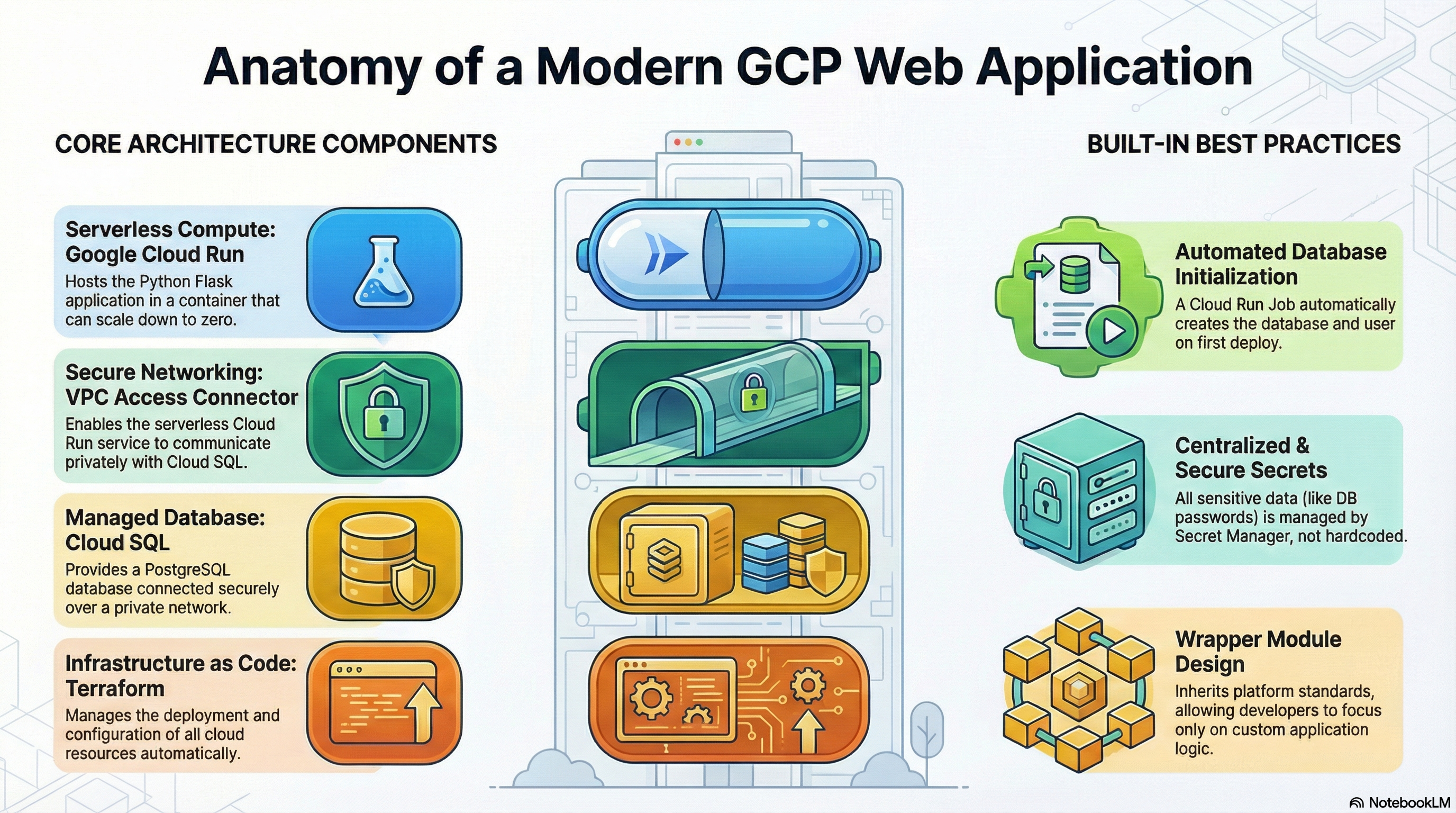
The Sample module acts as a reference implementation for deploying custom web applications on Google Cloud Platform. It demonstrates how to build a production-ready "Wrapper Module" that inherits the platform's best practices while deploying a custom Python Flask application.
Key Benefits
- Blueprint for Success: serves as a copy-pasteable template for developers to create their own custom modules.
- Best Practices: Implements secure networking, secrets management, and IAM according to strict standards.
- Full Stack Demo: Deploys a complete stack including Compute (Cloud Run), Database (Cloud SQL), and Storage (GCS).
Functionality
- Deploys a Python Flask application.
- Connects to a PostgreSQL database via Unix Sockets.
- Demonstrates automated database schema initialization using Cloud Run Jobs.
- Shows how to handle secret injection and environment configuration.
1. Technical Summary
The Sample module acts as a reference implementation for deploying custom web applications on the Google Cloud Platform (GCP) using the platform's wrapper module architecture. It leverages the foundation CloudRunApp module to deploy a Python Flask application connected to a Cloud SQL PostgreSQL database. It demonstrates best practices for containerization, database initialization, secrets management, and secure networking.
2. Architecture Overview
The module employs a serverless architecture centered around Cloud Run, utilizing a "Wrapper Module" pattern where Sample inherits infrastructure logic from CloudRunApp via symlinks, defining only its specific configuration in sample.tf and application logic in scripts/sample.
Components:
- Compute: Google Cloud Run v2 Service (Serverless container).
- Database: Cloud SQL (PostgreSQL), connected via private IP or Unix Socket.
- Networking: Serverless VPC Access Connector for private network access.
- Configuration: Terraform for infrastructure; Docker for application runtime.
- Initialization: Cloud Run Job for database schema and user creation.
3. IAM and Access Control
Identity and Access Management (IAM) is handled primarily through Service Accounts (SA) and Role-Based Access Control (RBAC).
3.1. Service Accounts
- Cloud Run Service Account (
cloud_run_sa):- Identity: Runs the application container and initialization jobs.
- Creation: Can be auto-created by the module or supplied externally via variable.
- Permissions:
roles/secretmanager.secretAccessor: Access to DB passwords and env vars.roles/storage.objectAdmin: Access to GCS buckets (if configured).roles/storage.legacyBucketReader: For metadata access (e.g., django-storages).
- Cloud Build Service Account (
cloud_build_sa):- Identity: Executes CI/CD pipelines and custom builds.
- Permissions:
roles/run.developer: To deploy the service.roles/iam.serviceAccountUser: To act as the Cloud Run SA.roles/secretmanager.secretAccessor: Access to GitHub tokens.
3.2. Access Policies
- Public Access: The module defaults to public access (
roles/run.invokergranted toallUsers). - Internal Access: Can be restricted by removing the
allUsersbinding inservice.tf(requires modification or overridingservice_annotationsto set ingress tointernal).
4. Service Implementation & Configuration
4.1. Cloud Run Service (service.tf)
The core service is a Cloud Run v2 service.
- Container Image: Builds from
scripts/sample/Dockerfile(Python 3.11-slim) or uses a pre-built image. - Resources:
- CPU:
1000m(1 vCPU). - Memory:
512Mi(Configurable). - CPU Boost: Enabled for faster startup.
- CPU:
- Scaling:
min_instance_count: 0 (Scales to zero).max_instance_count: 1 (Limits concurrency).
- Networking:
- Ingress:
INGRESS_TRAFFIC_ALL(Public). - VPC Egress: Configured via
vpc_accessblock to route traffic to Cloud SQL.
- Ingress:
- Probes:
- Startup Probe: Checks
/healthzto confirm app startup. - Liveness Probe: Periodic checks to ensure app health.
- Startup Probe: Checks
- Environment Variables:
DB_HOST,FLASK_ENV,PORT.- Secrets injected as env vars (e.g.,
DB_PASSWORD).
4.2. Database & Storage (sql.tf, secrets.tf, storage.tf)
- Cloud SQL:
- Discovery: Uses
scripts/core/get-sqlserver-info.shto find existing SQL instances. - Connection: Supports Unix Socket (via
enable_cloudsql_volume = true) or TCP IP. - Security: Password generated via
random_passwordand stored in Secret Manager.
- Discovery: Uses
- Initialization (
jobs.tf,sample.tf):- Defines an
initialization_jobsblock insample.tf. - Job:
db-initusespostgres:15-alpine. - Script:
scripts/sample/db-init.shwaits for the DB, checks/creates the user, and creates the database. - Execution: Runs via
local-exectrigger on Terraform apply.
- Defines an
4.3. Networking (network.tf)
- VPC Discovery: Uses
scripts/core/get-network-info.shto identify the VPC and Subnets. - Connector: Relies on an existing Serverless VPC Access Connector for egress.
5. Existing Features
- Wrapper Architecture: Seamlessly inherits platform best practices while allowing custom application logic.
- Automated DB Init: "Day 0" operations (DB creation, User creation) are automated via Cloud Run Jobs.
- Secure Secrets: No hardcoded passwords; all sensitive data is in Secret Manager.
- Custom Builds: Integrated support for building containers from source (
Dockerfile) or uses upstream images. - Observability: Built-in support for Startup/Liveness probes.
- CI/CD Hooks: Infrastructure-as-Code includes triggers for Cloud Build (
trigger.tf).
6. Potential Enhancements
6.1. IAM & Security
- Granular Access: Expose a variable to restrict
roles/run.invokerto specific groups instead ofallUsers. - Workload Identity: strictly enforce Workload Identity Federation for any external integrations.
6.2. Configuration
- CDN/Load Balancing: Integration with Global Load Balancer (Cloud CDN) for static asset caching.
6.3. Operational
- Readiness Probes: Add a distinct readiness probe (e.g., checking DB connectivity) separate from liveness.
- Structured Logging: Ensure the Flask app emits JSON-formatted logs for better parsing in Cloud Logging (currently uses standard stdout).
- Alerting: Create specific alert policies for high error rates or latency in
monitoring.tf.