Moodle on Google Cloud Platform
🎧
Moodle on Google Cloud Platform Audio
Overview
The Moodle module enables educational institutions and training organizations to launch a powerful Learning Management System (LMS) on Google Cloud. It transforms the complex task of setting up Moodle servers into a simple automated process, providing a robust platform for online learning.
Key Benefits
- Scalable Learning: Capable of supporting thousands of concurrent students by leveraging Google Cloud's auto-scaling infrastructure.
- High Performance: Optimized configuration for fast page loads and reliable video/content delivery.
- Data Safety: Automated backups for course data and student records ensuring you never lose critical information.
- Global Reach: Can be deployed in regions closest to your students for the best user experience.
Functionality
- Installs the Moodle LMS software on Cloud Run.
- Configures a high-performance database connection.
- Sets up a massive shared file system (
moodledata) for storing course materials, assignments, and videos. - Automates the "Cron" jobs required for Moodle's background tasks (e.g., sending forum emails, grading).
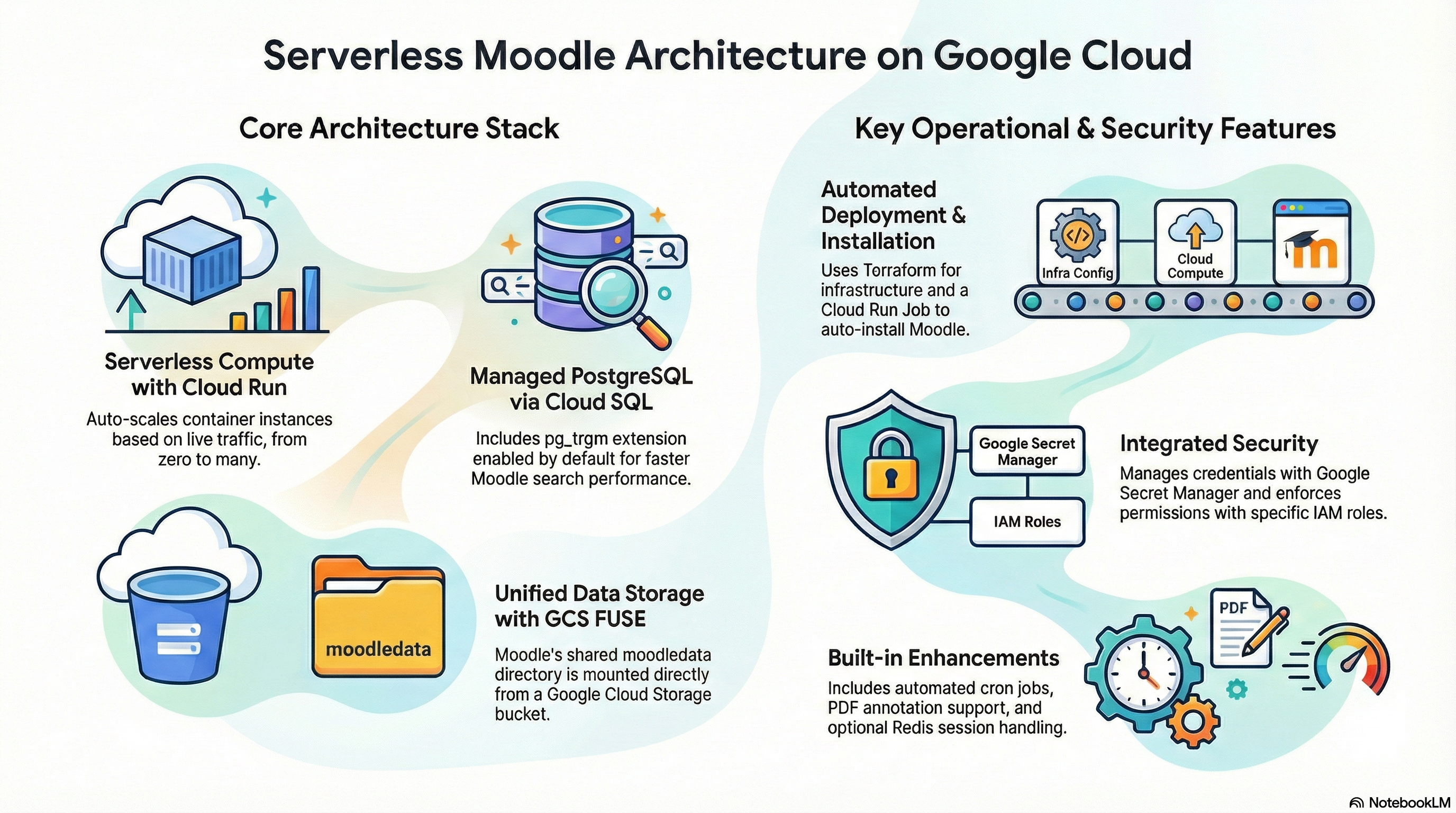
The Moodle module is a containerized deployment leveraging Google Cloud Run for serverless compute, Cloud SQL (PostgreSQL) for the database, and Google Cloud Storage (GCS) FUSE for the shared data directory (moodledata). It is wrapped by the CloudRunApp foundation module, inheriting standardized networking, IAM, and secret management patterns.
2. Architecture & Services
Compute: Cloud Run
- Runtime:
gen2execution environment. - Scaling: Configurable min/max instances (Default: 0-5).
- Base Image: Custom build based on
ubuntu:24.04with PHP 8.3 and Apache. - Entrypoint: Uses
tinias process 1, wrapping a customcloudrun-entrypoint.shand Apache foreground script.
Database: Cloud SQL
- Engine: PostgreSQL 15.
- Connection: Uses Unix Socket connection via Cloud Run Cloud SQL integration (
/var/run/postgresql). - Extensions: Automatically enables
pg_trgm(trigram) for improved Moodle search performance.
Storage Strategy (Critical Architecture Note)
The module provisions two storage types, but the application is configured to primarily use one:
- GCS FUSE (Primary):
- Mount Path:
/gcs/moodle-data - Configuration: The
moodle-config.phpexplicitly sets$CFG->dataroot = '/gcs/moodle-data'. - Mechanism: Uses Cloud Run's native GCS volume mount feature.
- Permissions: Runtime Service Account has
storage.objectAdmin.
- Mount Path:
- Filestore NFS (Secondary/Legacy):
- Mount Path:
/mnt - Status: While
moodle.tfprovisions and mounts NFS, thecloudrun-entrypoint.shandmoodle-config.phpfocus on the GCS path. The NFS mount may be available for specific plugins or legacy reasons but is not the activedatarootin the current default configuration.
- Mount Path:
Networking
- Ingress: Supports
internal,internal-and-cloud-load-balancing, orall. - Egress: Configured to route private ranges through the VPC (Serverless VPC Access) to reach Cloud SQL and Filestore.
3. IAM & Access Control
Service Accounts
- Cloud Run Service Account (Runtime Identity):
- Role:
roles/secretmanager.secretAccessor- Access to DB password, SMTP password, Cron password. - Role:
roles/storage.objectAdmin- Full control over the Moodle Data GCS bucket. - Role:
roles/storage.legacyBucketReader- Metadata access (required for some storage libraries).
- Role:
- Cloud Build Service Account (CI/CD):
- Role:
roles/run.developer- Ability to deploy new revisions. - Role:
roles/iam.serviceAccountUser- Ability to impersonate the Runtime SA during deployment.
- Role:
Secrets Management
- Storage: Google Secret Manager.
- Secrets Created:
MOODLE_DB_PASSWORDMOODLE_CRON_PASSWORD(Randomly generated 32-char string)MOODLE_SMTP_PASSWORD
4. Configuration Details
Terraform Configuration (moodle.tf)
- Environment Variables:
MOODLE_DB_TYPE: Hardcoded topgsql.MOODLE_REVERSE_PROXY: Set totrue(Essential for correct URL generation behind Cloud Run/LB).MOODLE_WWWROOT: Predicable URL generation based on Project ID and Region.
- Initialization Jobs:
db-init: A Cloud Run Job usingpostgres:15-alpineto wait for the DB, create themoodleuser/db, and install extensions.moodle-install: Runsadmin/cli/install_database.phpif Moodle is not detected.
Docker & Runtime Configuration
- PHP Extensions:
gd,pgsql,intl,soap,xmlrpc,zip,mbstring,redis. - Apache: Configured with
foreground.shto run as the main process. - Moodle Config (
moodle-config.php):- Dynamic DB Host: Detects if
DB_HOSTstarts with/to toggle Socket vs TCP mode. - Health Check Bypass: Explicitly returns "ok" for
GoogleHCUser-Agent to prevent health check logic from triggering heavy Moodle bootstrapping. - Permissions: Sets
directorypermissionsto02777(required for GCS FUSE compatibility). - Redis Support: If
redis_enabledis true, configures$CFG->session_handler_classto use Redis, offloading session I/O from GCS.
- Dynamic DB Host: Detects if
5. Existing Features
- Automated Cron: A Cloud Scheduler job hits
/admin/cron.php?password=...every minute. - Auto-Installation: The system attempts to self-install on first boot via the
moodle-installjob. - PDF Annotation:
ghostscriptis installed to support Moodle's PDF annotation features. - Redis Session Handling: Optional configuration to use an external Redis instance for PHP sessions, reducing latency and storage I/O.
6. Potential Enhancements
Performance
- CDN: Implementing Cloud CDN for static assets (
/theme/,/lib/javascript/) would significantly reduce container load and latency.
Security
- Cloud Armor: Attach a security policy to the Load Balancer to protect against common web attacks (WAF).
- Identity-Aware Proxy (IAP): Could be enabled for the admin path or non-public deployments.
Reliability
- Read Replicas: Configure Cloud SQL Read Replicas for reporting-heavy Moodle instances.
- Backup Strategy: While Cloud SQL has backups, ensuring the GCS bucket (
moodle-data) has Object Versioning or separate backup routines is critical.