Directus on Google Cloud Platform
Directus on Google Cloud Platform Audio
Overview
The Directus module deploys Directus, an open data platform, on Google Cloud. It instantly turns any SQL database into an API and provides a beautiful no-code app for managing the content.
Key Benefits
- Instant Backend: Automatically generates REST and GraphQL APIs based on your database schema.
- No-Code Management: Provides a modern, intuitive Admin App for non-technical users to manage content.
- Database Autonomy: Directus mirrors your SQL database. You stay in control of your data and schema without vendor lock-in.
- Scalable & Serverless: Runs on Cloud Run, scaling automatically to handle high traffic loads while keeping costs low during idle times.
Functionality
- Deploys the Directus container with PostGIS extensions.
- Connects to a managed Cloud SQL (PostgreSQL) database.
- Integrates with Cloud Storage for limitless asset management.
- Automates database migrations and bootstrapping on deployment.
This document provides a comprehensive analysis of the Directus module implementation. It details the architecture, IAM security model, service configurations, and opportunities for enhancement.
1. Architectural Overview
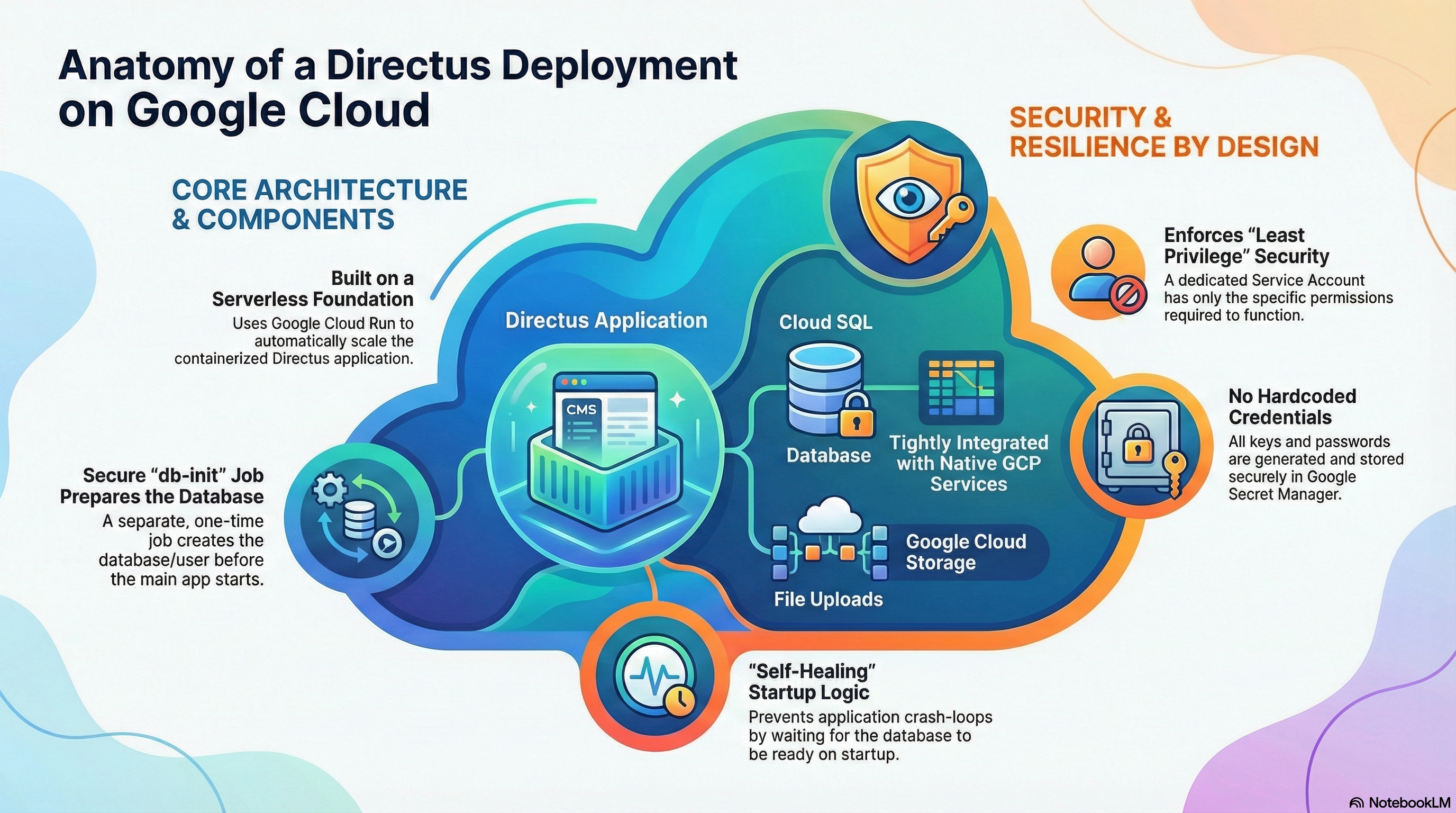
The Directus module is implemented using a "Wrapper Module" pattern. It leverages a core infrastructure module (CloudRunApp) to provision the underlying GCP resources while injecting Directus-specific configurations, secrets, and container logic.
- Compute: Google Cloud Run (Serverless Container).
- Database: Cloud SQL (PostgreSQL 15) with PostGIS extensions.
- Storage: Google Cloud Storage (GCS) mounted via Cloud Run Volume mounts.
- Configuration: Terraform-managed Environment Variables and Secret Manager secrets.
2. IAM & Access Control Configuration
The module enforces a "Least Privilege" security model through a dedicated Service Account assigned to the Cloud Run service.
Service Account Permissions
Based on the resource interactions in directus.tf and docker-entrypoint.sh, the Service Account is configured with the following capabilities:
| Service | Capability | Reason |
|---|---|---|
| Cloud SQL | roles/cloudsql.client | Required for the application to connect to the Cloud SQL instance using the Auth Proxy or direct IP connection. |
| Secret Manager | roles/secretmanager.secretAccessor | Required to mount sensitive environment variables (KEY, SECRET, DB_PASSWORD, ADMIN_PASSWORD) at runtime. |
| Cloud Storage | roles/storage.objectAdmin | Required for the Cloud Run GCS Volume mount (/directus/uploads) to read and write user-uploaded assets. |
| Logging | roles/logging.logWriter | Standard Cloud Run permission to write application logs to Cloud Logging. |
Authentication & Secrets
Critical credentials are never stored in plain text. They are generated via Terraform random_password resources and stored immediately in Google Secret Manager.
ADMIN_PASSWORD: Initial admin user password.KEY&SECRET: Directus security keys for signing tokens.DB_PASSWORD: Database user credentials.
3. Service Implementation & Configuration
A. Container & Build Strategy
The module uses a Custom Build strategy rather than a vanilla upstream image.
- Base Image:
directus/directus:11.1.0. - Modifications:
- Installs
postgresql-client(used for health checks in entrypoint). - Installs
@directus/storage-driver-gcs(enables native GCS support if configured). - Creates a custom entrypoint script
docker-entrypoint.sh.
- Installs
B. Startup Logic (docker-entrypoint.sh)
The custom entrypoint adds resilience to the stateless Cloud Run environment:
- Cloud Run Detection: Identifies execution environment via
K_SERVICE. - Database Wait: Uses
pg_isreadywith a retry loop to ensure Cloud SQL is accessible before starting the app. - Migration & Bootstrap:
- Runs
npx directus database migrate:latestifAUTO_MIGRATE=true. - Runs
npx directus bootstrapifBOOTSTRAP=true.
- Runs
C. Initialization Jobs
Uniquely, this module defines a db-init Job (run via Cloud Run Jobs or an ephemeral container) that executes before the main application starts.
- Purpose: Securely sets up the database without giving the main application "Superuser" rights.
- Actions:
- Creates the
directusdatabase user. - Creates the
directusdatabase. - Installs PostgreSQL extensions:
uuid-osspandpostgis(Geospatial support).
- Creates the
D. Configuration Map (Environment Variables)
| Category | Variable | Value/Setting | Notes |
|---|---|---|---|
| Connectivity | PORT | 8055 | Maps to Cloud Run internal port. |
| Connectivity | CORS_ENABLED | true | Allows cross-origin requests (essential for Headless usage). |
| Connectivity | WEBSOCKETS_ENABLED | true | Enables real-time subscriptions. |
| Storage | STORAGE_LOCATIONS | local | Crucial: Uses "local" driver pointing to the GCS Fuse mount at /directus/uploads. |
| Storage | STORAGE_LOCAL_ROOT | /directus/uploads | |
| Database | DB_CLIENT | pg | PostgreSQL driver. |
| Performance | CACHE_ENABLED | false | Redis caching is currently disabled by default. |
| Performance | RATE_LIMITER_ENABLED | false | Disabled by default. |
4. Existing Features
- GCS Fuse Integration: Uses Cloud Run's second-generation execution environment to mount a GCS bucket as a file system. This allows Directus to treat object storage as a standard local disk, simplifying configuration.
- Geospatial Support: Explicitly enables PostGIS, allowing Directus to handle complex map/location data types.
- Zero-Downtime Deployment Readiness: The
livenessandstartupprobes are tuned (/server/health) to prevent traffic from hitting the container until it is fully ready. - Self-Healing: The
wait_for_dblogic prevents crash-loops during cold starts when the database might be waking up.
5. Potential Enhancements & Recommendations
A. Performance & Scaling (High Impact)
- Cloud CDN:
- Enhancement: Enable Cloud CDN on the Load Balancer for the
/assets/*path. - Benefit: Offloads asset delivery from the Directus Node.js process, lowering costs and improving speed for end-users.
- Enhancement: Enable Cloud CDN on the Load Balancer for the
B. Observability
- Structured Logging:
- Current:
LOG_STYLE=jsonis set in Dockerfile, which is excellent for Cloud Logging. - Enhancement: Integrate
OpenTelemetryor trace headers to correlate frontend requests with backend database queries.
- Current:
C. Security
- Rate Limiting:
- Enhancement: Enable
RATE_LIMITER_ENABLEDand back it with Redis. - Benefit: Protects the API from brute-force attacks or runaway scripts.
- Enhancement: Enable