Wiki.js on Google Cloud Platform
Wiki.js on Google Cloud Platform Audio
Overview
The Wiki.js module deploys the most powerful and extensible open-source wiki software on Google Cloud. It is designed to make knowledge management beautiful and intuitive for teams of all sizes.
Key Benefits
- Modern Interface: Features a beautiful, responsive UI that makes writing documentation a pleasure.
- Git-Backed: content can be synced with a Git repository, providing version control and backup.
- Powerful Search: Native full-text search capability (via PostgreSQL) ensures users can find what they need instantly.
- Extensible: Modular architecture supports various authentication providers, editors (Markdown, WYSIWYG), and storage backends.
Functionality
- Deploys Wiki.js container.
- Connects to a managed Cloud SQL (PostgreSQL) database with
pg_trgmextension enabled. - Mounts Cloud Storage (GCS) for scalable asset storage.
- Configures auto-scaling and health checks.
This document details the implementation of the Wiki.js module, covering its architecture, security posture, configuration, and potential enhancements.
1. Architecture & Services
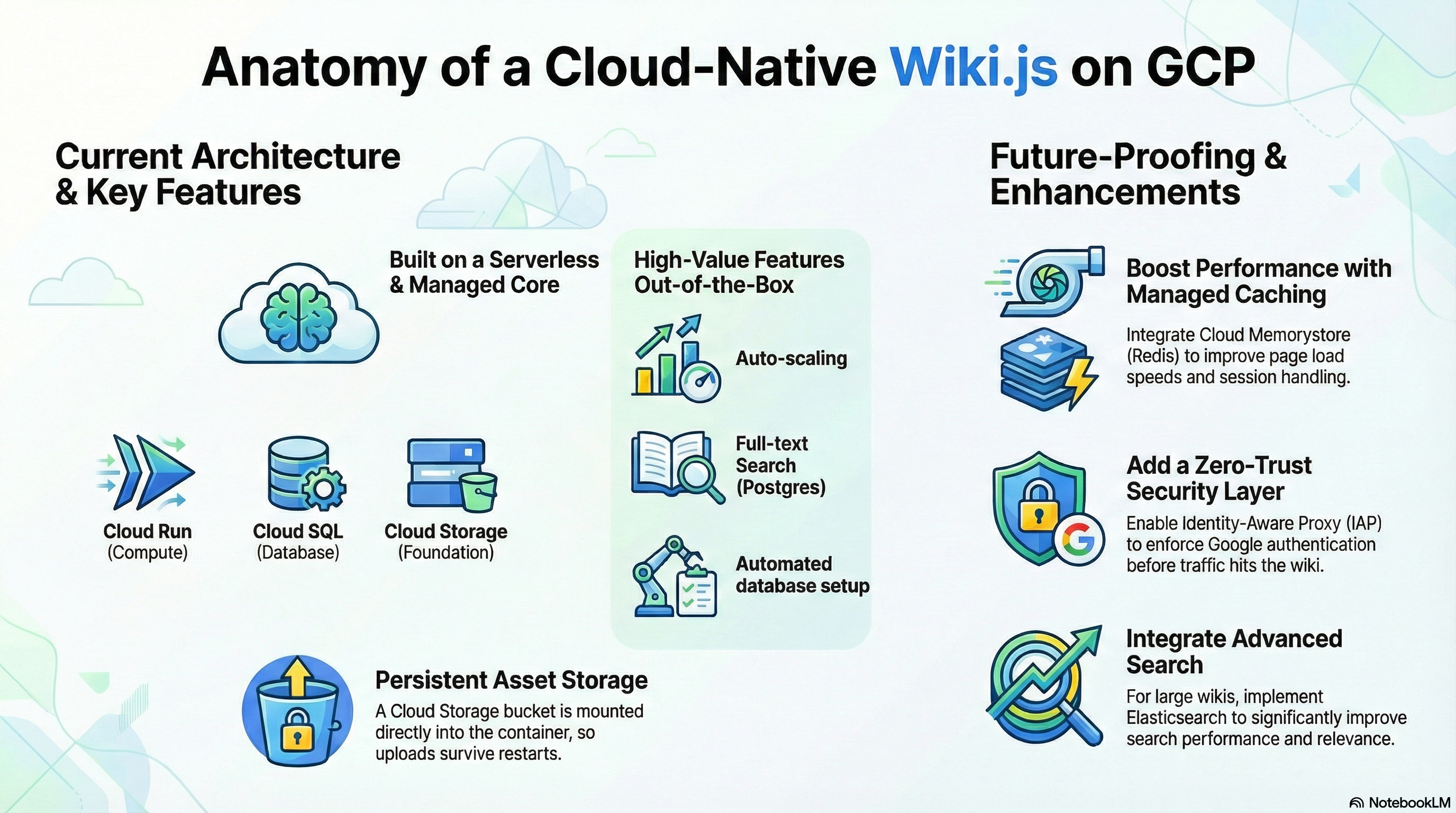
The module deploys Wiki.js as a containerized application on Google Cloud Run, backed by managed Cloud SQL (PostgreSQL) and Cloud Storage.
-
Compute (Cloud Run):
- Service: Wiki.js runs as a stateless container (Gen2 execution environment).
- Scaling: Configured for auto-scaling (0-3 instances by default) based on load.
- Networking: Listens on port 3000. Ingress can be restricted to internal traffic or open to the public via
ingress_settings. - Probes: Includes Liveness and Startup probes pointing to
/healthz.
-
Database (Cloud SQL):
- Engine: PostgreSQL 15.
- Connectivity: Connects via Cloud SQL Unix Socket (mounted at
/cloudsql) or Internal IP. - Extensions:
pg_trgmis explicitly enabled to support Wiki.js native full-text search. - Initialization: A dedicated "self-healing" initialization job (
db-init) runs on deployment to ensure the database user and schema exist.
-
Storage:
- Object Storage (GCS): A Google Cloud Storage bucket (
wikijs-storage) is mounted via GCS FUSE to/wiki-storagewithin the container. This provides scalable, persistent storage for uploads and assets. - NFS (Optional): Supports mounting an NFS volume to
/mntif an NFS server is detected in the environment.
- Object Storage (GCS): A Google Cloud Storage bucket (
-
Caching (Redis):
- The module implements logic to auto-detect an NFS server and use it as a Redis host (
REDIS_HOST) if available. This suggests a shared infrastructure pattern where the NFS server also acts as a Redis cache.
- The module implements logic to auto-detect an NFS server and use it as a Redis host (
2. IAM & Access Control
The module enforces the Principle of Least Privilege using dedicated Service Accounts (SA) for different lifecycle stages.
Service Accounts
-
Cloud Run SA (Runtime Identity):
- Role:
roles/cloudsql.client- Allows connection to Cloud SQL. - Role:
roles/secretmanager.secretAccessor- Allows retrieving the database password and environment secrets. - Role:
roles/storage.objectAdmin- Grants full control over thewikijs-storagebucket for uploads. - Role:
roles/storage.legacyBucketReader- Grants metadata access (required for some storage clients).
- Role:
-
Cloud Build SA (CI/CD Identity):
- Role:
roles/run.developer- Allows deploying new revisions to Cloud Run. - Role:
roles/iam.serviceAccountUser- Allows "acting as" the Cloud Run SA during deployment. - Role:
roles/secretmanager.secretAccessor- Allows accessing GitHub tokens for build triggers.
- Role:
Secret Management
- Database Credentials: Passwords are generated and stored in Secret Manager, then injected into the container as environment variables (
DB_PASS). - Environment Secrets: Additional sensitive variables can be mapped from Secret Manager via
secret_environment_variables.
3. Configuration
Terraform Configuration (wikijs.tf)
The module uses a "wrapper" pattern, leveraging a shared core (CloudRunApp) while defining Wiki.js-specific logic in wikijs.tf:
- Image: Uses the official
requarks/wikiimage (defaulting to version2). - Resources: Default allocation is 1 vCPU and 2Gi Memory.
- Environment Variables:
DB_TYPE:postgresHA_STORAGE_PATH:/wiki-storage(Configures Wiki.js to use the mounted GCS bucket for high availability storage).DB_SSL:false(Standard for Cloud SQL Auth Proxy/Socket connections).
Container Customization
- Dockerfile: Minimal wrapper (
FROM requarks/wiki:2). - Entrypoint: Relies on the standard Wiki.js entrypoint but supplements it with the
db-initCloud Run Job to handle database provisioning before the app starts.
4. Existing Features
- Full-Text Search: Enabled out-of-the-box via
pg_trgmextension on Postgres. - Persistent Asset Storage: Uploads survive container restarts thanks to GCS FUSE integration.
- Automated Database Setup: The
db-initjob removes the need for manual DB user/schema creation. - Auto-Scaling: Cloud Run handles traffic spikes automatically.
- CI/CD Integration: Built-in support for Cloud Build triggers via
enable_cicd_trigger.
5. Potential Enhancements
While the current configuration is robust, the following enhancements could improve performance, security, and manageability:
Performance & Scalability
- Dedicated Redis: Instead of relying on the NFS server for Redis, integrate Cloud Memorystore (Redis). This provides a managed, highly available cache closer to the Cloud Run service, improving session handling and page load speeds.
- Advanced Search: For large wikis, the Postgres search may become a bottleneck. Integrating Elasticsearch or MeiliSearch (as a sidecar or managed service) would significantly improve search relevance and performance.
- CDN Integration: Enable Cloud CDN on the Load Balancer to cache static assets (images, CSS, JS) at the edge, reducing container load and latency.
Security
- Identity Aware Proxy (IAP): If the Wiki is internal, enable IAP on the Load Balancer. This enforces Google Identity authentication before traffic reaches the container, adding a zero-trust security layer.
- SSO Configuration: Currently, SSO (Google, GitHub, SAML) must be configured in the Wiki.js UI. This can be automated by injecting a
config.ymlfile or specificAUTH_*environment variables during the build/deploy process to enforce authentication policies as code.
Observability
- Application Metrics: Wiki.js exposes metrics. Configuring a Prometheus sidecar or using the OpenTelemetry collector to scrape these metrics and send them to Cloud Monitoring would provide deeper insights into wiki usage (active users, pages created, errors).
Functionality
- PDF Generation: The base Alpine image may lack libraries required for the "Export to PDF" feature (e.g., Chromium). Extending the Dockerfile to install these dependencies would enable server-side PDF rendering.
- Backup Strategy: While Cloud SQL has automated backups, implementing a scheduled job to export Wiki.js specific data (assets + DB dump) to a "Cold Storage" bucket would provide disaster recovery beyond the standard 7-day window.