N8N on Google Cloud Platform
N8N on Google Cloud Platform Audio
Overview
The N8N module deploys n8n, a fair-code workflow automation tool, onto Google Cloud. This tool allows your business to connect disparate apps, APIs, and data sources to automate processes without writing complex code.
Key Benefits
- Own Your Automation: Unlike SaaS automation tools, you host this yourself, giving you full control over your data and no per-execution fees.
- Enterprise Grade: Runs on Google Cloud's secure infrastructure with a dedicated database, making it suitable for mission-critical workflows.
- Cost Efficient: Serverless deployment means you pay for the compute only when your workflows are actually running (or keep it minimum for listeners).
- Secure Connectivity: Deploy within your private VPC to securely connect to internal databases and services that aren't exposed to the public internet.
Functionality
- Deploys the n8n editor and execution engine on Cloud Run.
- Provisions a dedicated PostgreSQL database for storing workflow definitions and execution history.
- Configures webhook endpoints to trigger automations from external events.
This document provides a comprehensive analysis of the N8N implementation, detailing its architecture, IAM configuration, services, and potential enhancements.
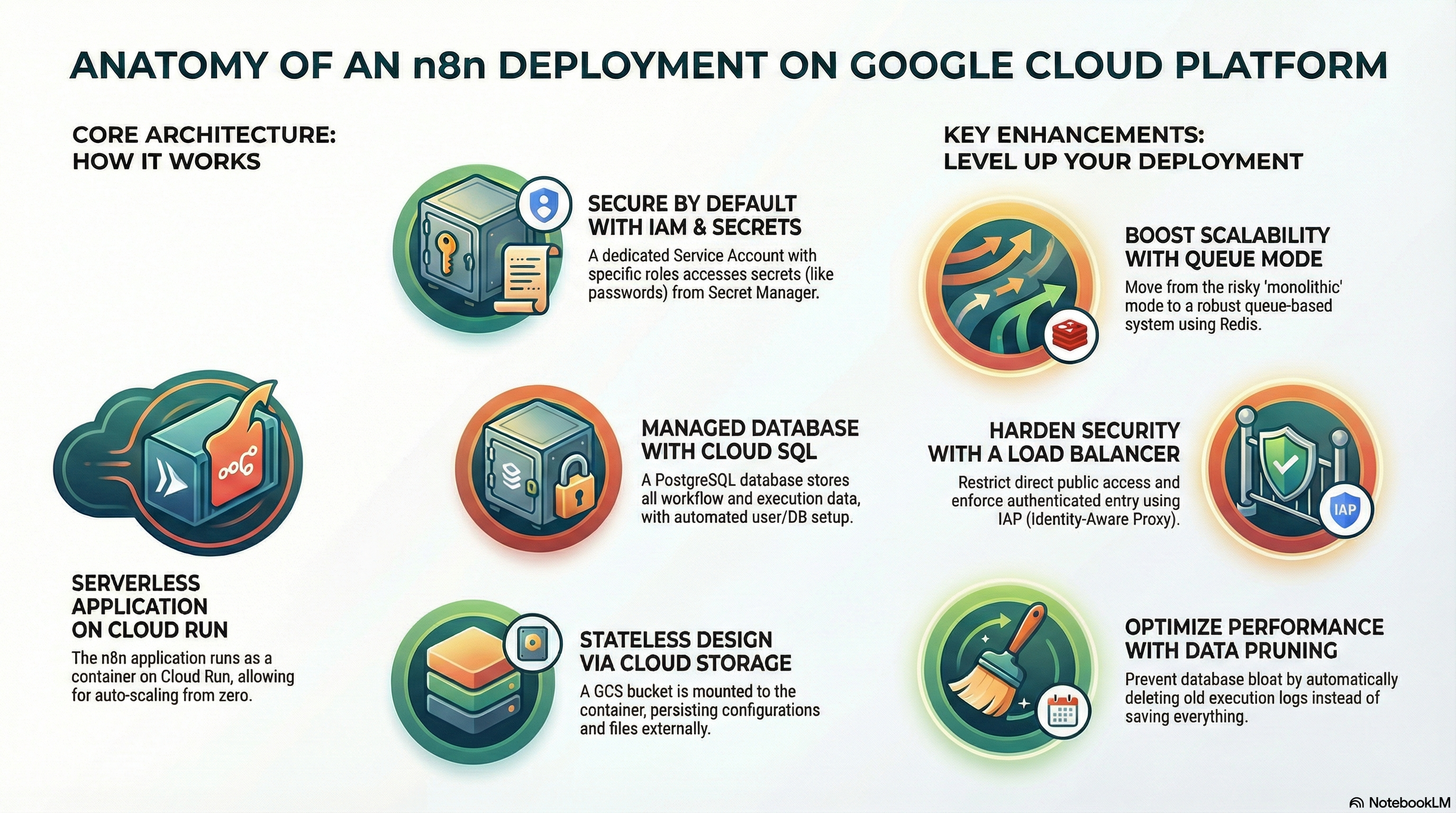
The modules/N8N module is a Wrapper Module that leverages the core logic from modules/CloudRunApp. It deploys the n8n workflow automation platform as a containerized service on Google Cloud Run, backed by Cloud SQL (PostgreSQL) and Cloud Storage for persistence.
2. IAM and Access Control
The module relies on a Service Account (SA) model to securely access GCP resources. The primary identity is the Cloud Run Service Account (cloudrun-sa), which is typically provisioned by the dependency module modules/GCP_Services.
Service Accounts
cloudrun-sa: The identity under which the n8n application runs.cloudbuild-sa: Used for CI/CD and image building operations (if enabled).
IAM Roles & Permissions
The cloudrun-sa is granted the following permissions (via modules/GCP_Services and modules/N8N/iam.tf):
- Cloud SQL Client (
roles/cloudsql.client): Allows the n8n container to connect to the Cloud SQL PostgreSQL instance via the Unix socket. - Storage Object Admin (
roles/storage.objectAdmin): Granted explicitly on then8n-databucket to allow n8n to read/write workflow data, binary data, and configuration files. - Secret Manager Accessor (
roles/secretmanager.secretAccessor): Allows access to specific secrets:- Database Password (
DB_POSTGRESDB_PASSWORD) - SMTP Password (
N8N_SMTP_PASS) - Encryption Key (
N8N_ENCRYPTION_KEY)
- Database Password (
- Service Account User (
roles/iam.serviceAccountUser): often required for the build service account to deploy the run service.
Access Control (Ingress/Egress)
- Ingress: Configurable via
ingress_settings(default:all/ public). Access can be restricted tointernalorinternal-and-cloud-load-balancing. - Egress: Configurable via
vpc_egress_setting. Default is typicallyPRIVATE_RANGES_ONLY, allowing private access to Cloud SQL and other VPC resources while routing public traffic directly.
3. Services Implemented
1. Cloud Run (Application)
- Image: Uses
n8nio/n8n(default) or a custom build viascripts/n8n/Dockerfile. - Resources: Configurable CPU/Memory (default: 2 vCPU, 4Gi Memory).
- Scaling: Min instances: 0, Max instances: 3.
- Session Affinity: Enabled (
session_affinity = true) to support multiple instances without immediate disconnects, though full multi-instance support requires Redis (see Enhancements). - Probes:
- Startup Probe: HTTP GET
/(120s delay) to allow n8n to initialize/migrate DB. - Liveness Probe: HTTP GET
/(30s delay) to ensure the service is responsive.
- Startup Probe: HTTP GET
2. Cloud SQL (Database)
- Engine: PostgreSQL 15.
- Connection: Connected via Unix Socket (
/cloudsql/...). - Initialization: A dedicated Initialization Job (
db-init) runs on deploy to:- Create the
n8n_user. - Create the
n8n_db. - Grant necessary privileges.
- Create the
3. Cloud Storage (Persistence)
- Bucket: Creates a bucket suffixed with
-n8n-data. - Mounting: Mounted via GCS FUSE to
/home/node/.n8n. - Purpose: Persists n8n configuration, encryption keys, and binary data (if
N8N_DEFAULT_BINARY_DATA_MODE=filesystem).
4. Secret Manager (Configuration)
encryption-key: Auto-generated 32-char key for n8n credential encryption.smtp-password: Auto-generated dummy password (intended to be updated manually or via external config).db-password: Database user password.
4. Configuration Details
Environment Variables
Key variables configured in n8n.tf:
N8N_PORT:5678DB_TYPE:postgresdbN8N_ENCRYPTION_KEY: Loaded from Secret Manager.EXECUTIONS_DATA_SAVE_ON_ERROR:all(Debug friendly).EXECUTIONS_DATA_SAVE_ON_SUCCESS:all(Can be verbose, see enhancements).N8N_DEFAULT_BINARY_DATA_MODE:filesystem(Optimized for Cloud Run memory limits).
Optional Configurations
- SMTP: configured via
N8N_SMTP_HOST,N8N_SMTP_USER, etc. (Default is empty/dummy). - NFS: Supported via
nfs_enabledvariable (mapped to/mntif enabled), useful if high-performance shared file storage is needed beyond GCS.
5. Existing Features
- Automated Database Setup: The
initialization_jobsblock ensures the database is ready and users exist before the app starts, reducing manual toil. - Persistence Layer: Utilizing GCS FUSE allows n8n to be stateless in compute (Cloud Run) while maintaining stateful data (workflows, creds) in storage.
- Secure Defaults: Encryption keys are generated and stored in Secret Manager, not hardcoded.
- Custom Build Support: Includes a
Dockerfilebased onnode:22-alpineto allow adding custom nodes or system dependencies (likepython3,jq) easily.
6. Potential Enhancements
A. Scalability (Queue Mode)
- Current State: Monolithic mode. Multiple instances (
max_instance_count = 3) rely on sticky sessions. This is risky for long-running workflows or heavy loads. - Enhancement: Implement Redis (via
modules/GCP_Services/redis.tf) and configure n8n in Queue Mode.- Action: Add
QUEUE_BULL_REDIS_HOSTenv vars. Deploy separateworkerandwebhookservices (Cloud Run services with different entry commands).
- Action: Add
B. Performance Optimization
- Execution Data Pruning:
EXECUTIONS_DATA_SAVE_ON_SUCCESS=allcan bloat the database quickly.- Action: Set
N8N_Themor configure pruning settings (EXECUTIONS_DATA_PRUNE=true,EXECUTIONS_DATA_MAX_AGE=168) to auto-delete old logs.
- Action: Set
- Binary Data: Currently on GCS FUSE. For high I/O, consider Filestore (NFS) or specialized S3-compatible storage if GCS latency is high.
C. Security
- Service Account Scoping: The
cloudrun-sahasroles/storage.objectAdminon specific buckets, which is good. Ensure it doesn't have broader Project Editor permissions. - Public Access: Default ingress is
all.- Action: Restrict to
internal-and-cloud-load-balancingand put behind a Cloud Load Balancer (IAP) for secure, authenticated access to the n8n Editor UI.
- Action: Restrict to
D. Monitoring
- Application Metrics: N8N exposes metrics.
- Action: Configure
N8N_METRICS=trueandN8N_METRICS_INCLUDE_WORKFLOW_ID=true. Use OpenTelemetry collector sidecar to push to Cloud Monitoring.
- Action: Configure
E. Custom Nodes
- Enhancement: The current Dockerfile installs standard n8n.
- Action: Update
scripts/n8n/Dockerfiletonpm install n8n-nodes-custom-packageif specific community nodes are standard for the platform.
- Action: Update