Strapi on Google Cloud Platform
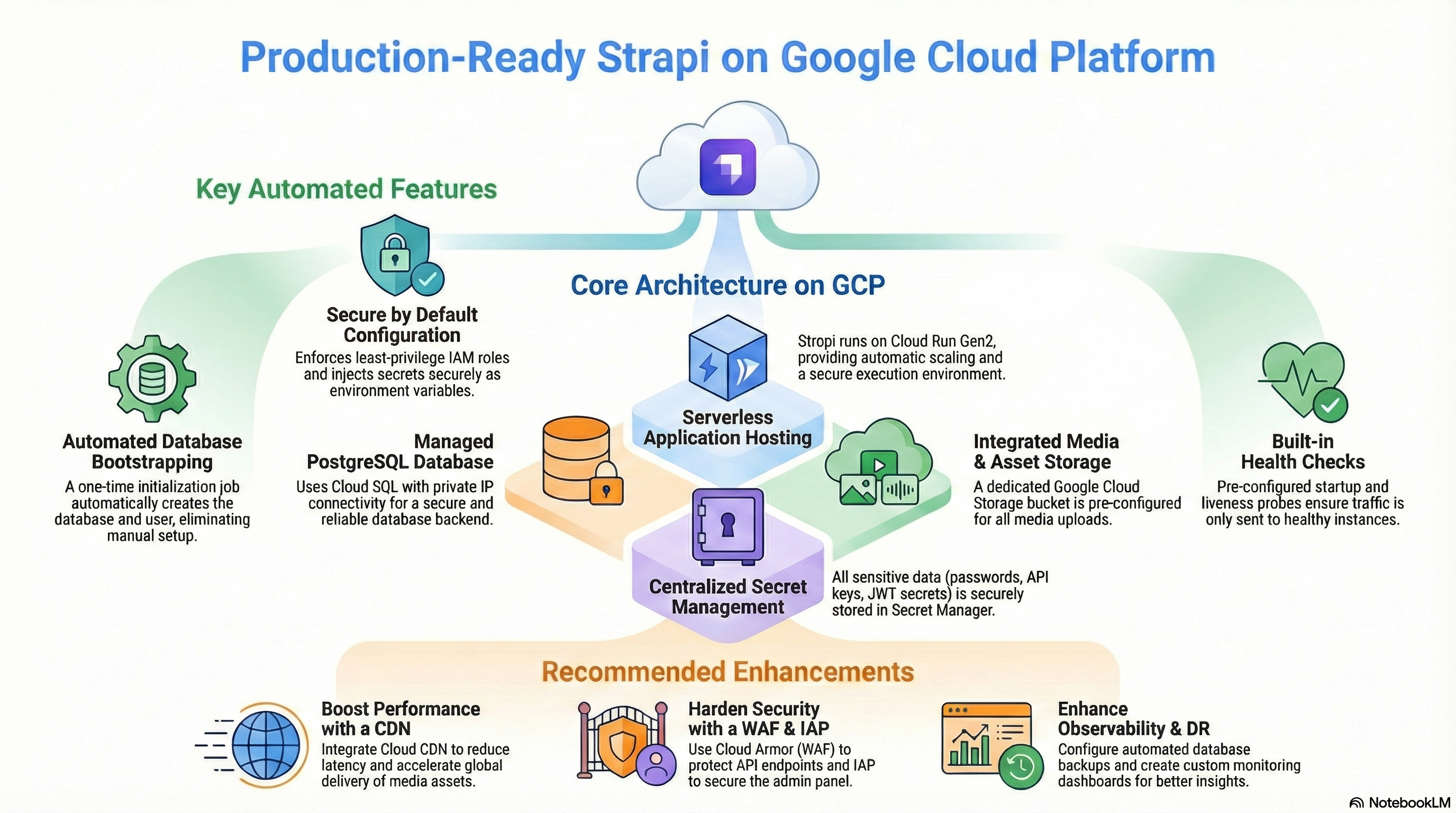
Strapi on the Google Cloud Platform Audio
Overview
The Strapi module deploys the leading open-source Headless CMS on Google Cloud. It empowers developers to build performant, customizable APIs while giving content editors a user-friendly interface.
Key Benefits
- Developer Freedom: Fully customizable API and content structure using standard Node.js.
- Omnichannel Delivery: Distribute content to websites, mobile apps, and IoT devices from a single source.
- Enterprise Scalability: Runs on Cloud Run with Cloud SQL, capable of handling high traffic and large datasets.
- Secure & Compliant: Self-hosted on your private Google Cloud infrastructure, ensuring data sovereignty.
Functionality
- Deploys Strapi v4/v5 container.
- Connects to a dedicated Cloud SQL (PostgreSQL) database.
- Integrates with Google Cloud Storage for media asset management.
- Automates database user creation and schema initialization.
This document provides a comprehensive analysis of the Strapi implementation on the Google Cloud Platform. It covers the architectural design, IAM and access control, service configurations, existing features, and potential enhancements.
1. Technical Overview
The modules/Strapi module is a wrapper around the modules/CloudRunApp foundation module. It streamlines the deployment of a production-ready Strapi (Headless CMS) application by pre-configuring necessary infrastructure components and application runtime settings.
Key Architecture Components:
- Compute: Cloud Run (Gen2)
- Database: Cloud SQL (PostgreSQL 15)
- Storage: Cloud Storage (GCS) for media assets
- Configuration: Secret Manager for sensitive data
- Networking: Serverless VPC Access (implied via CloudRunApp/GCP_Services)
2. IAM and Access Control Configuration
Access control is implemented using Google Cloud IAM, adhering to the principle of least privilege where possible. The configuration relies primarily on Service Accounts (SAs) bound to specific resources.
Service Accounts
-
Cloud Run Service Account: This is the identity under which the Strapi application runs.
- Roles:
roles/secretmanager.secretAccessor: Grants permission to access database credentials, JWT secrets, and API tokens stored in Secret Manager.roles/storage.objectAdmin: Grants full control over objects in thestrapi-uploadsbucket, allowing Strapi to upload, delete, and manage media files.roles/storage.legacyBucketReader: Grants metadata access to buckets (often required by storage libraries).roles/cloudsql.client: (Implicitly required/added via Cloud Run integration) Allows connection to the Cloud SQL instance.
- Roles:
-
Cloud Build Service Account (Optional): Used if CI/CD triggers are enabled.
- Roles:
roles/run.developer: Allows deploying new revisions to the Cloud Run service.roles/iam.serviceAccountUser: Allows the build service to act as the Cloud Run service account during deployment.roles/secretmanager.secretAccessor: Access to GitHub tokens for repository integration.
- Roles:
Database Access
- Initialization: A dedicated initialization job (
db-init) runs as a temporary container (Alpine Linux). It connects to the Cloud SQL instance using thepostgres(root) user credentials to:- Create a dedicated application user (
strapi). - Create the application database (
strapi). - Grant ownership and privileges to the application user.
- Create a dedicated application user (
- Runtime: The Strapi application connects using the dedicated
strapiuser credentials, ensuring it does not operate as the database root user.
Secret Management
Sensitive information is strictly managed via Secret Manager. The module automatically generates and stores:
database_password: For thestrapiDB user.jwt_secret: For Strapi authentication.admin_jwt_secret: For the Strapi Admin panel.api_token_salt: For API token generation.transfer_token_salt: For data transfer features.app_keys: Session and security keys.
3. Services Implemented and Configuration
Cloud Run (Application Hosting)
- Configuration:
- Image: Custom build based on
node:20-alpine. - Resources: Defaults to
1000mCPU and1GiMemory. - Scaling: Autoscaling configured (min: 0, max: 3 instances).
- Port: Listens on port
1337. - Execution Environment:
gen2(supports full Linux capabilities).
- Image: Custom build based on
- Probes:
- Startup Probe: TCP check on port
1337(Wait 60s, Period 10s). - Liveness Probe: HTTP GET to
/_health(Wait 60s, Period 30s).
- Startup Probe: TCP check on port
- Volumes:
- Cloud SQL Socket: Mounted at
/cloudsqlto facilitate Unix socket connections to the database.
- Cloud SQL Socket: Mounted at
Cloud SQL (Database)
- Engine: PostgreSQL 15.
- Connection: Configured for Private IP connectivity via VPC.
- Extensions: The module doesn't explicitly enable extensions in
strapi.tf, relying on Strapi's default needs or manual activation if required.
Cloud Storage (Media Library)
- Bucket: A dedicated bucket named
[project-id]-strapi-uploads(or similar suffix) is created. - Configuration:
location: Defaults to deployment region.storage_class: STANDARD.uniform_bucket_level_access: Enabled (recommended for security).public_access_prevention: "inherited" (allows public read if configured).
- Integration: Strapi is configured with
@strapi-community/strapi-provider-upload-google-cloud-storageto treat this bucket as the default upload provider.
Container Build (Docker)
- Base Image:
node:20-alpine. - Optimization: Uses a multi-stage build process.
- Build Stage: Installs
build-base,gcc,automake,nasm, and importantlyvips-dev(required for thesharpimage processing library). - Runtime Stage: Copies only production dependencies and build artifacts. Installs runtime
vips-dev.
- Build Stage: Installs
- Security: Runs as the non-root
nodeuser. - Entrypoint: Uses
tinito ensure proper signal handling (PID 1).
4. Existing Features
-
Automated Database Bootstrapping: The module includes a robust
db-initjob that idempotently creates the database and user. It waits for the DB to be ready, handles password updates, and ensures permissions are correct. This removes the need for manual DB setup. -
Integrated Media Uploads: Out-of-the-box integration with Google Cloud Storage. The
plugins.jsfile is pre-configured to use the GCS provider, mapping bucket name and public access settings from environment variables. -
Secure Configuration Injection: All critical secrets (DB passwords, salts, keys) are generated by Terraform, stored in Secret Manager, and injected into the container as environment variables. This prevents hardcoding secrets in code or VCS.
-
Email Provider Support (Optional): The
plugins.jsconditionally configures theemailprovider. IfSMTP_HOSTis defined in the environment variables, it sets upnodemailer. This allows easy integration with SendGrid, Mailgun, or other SMTP services without code changes. -
Health Checks: Pre-configured Startup and Liveness probes ensure traffic is only sent to healthy instances and unhealthy instances are automatically replaced.
5. Potential Enhancements
While the current implementation is robust, the following enhancements could improve performance, security, and manageability:
Performance & Scalability
- CDN Integration: Setting up Cloud CDN in front of the GCS bucket used for uploads would drastically reduce latency for media delivery.
Security
- Cloud Armor (WAF): If using an External Load Balancer, attach Cloud Armor policies to protect the Strapi Admin panel (
/admin) and API endpoints from attacks. - IAP (Identity-Aware Proxy): Secure the Strapi Admin panel (
/admin) behind IAP to enforce Google Workspace authentication.
Operations & Maintenance
- Database Backups: Explicitly configuring point-in-time recovery (PITR) and cross-region replication settings would enhance disaster recovery capabilities.
- Monitoring Dashboard: Creating a custom Cloud Monitoring Dashboard to visualize Strapi-specific metrics or Cloud Run performance would improve observability.
Functional
- Meilisearch / Algolia Integration: Provisioning a search service and configuring the relevant Strapi plugin would enable full-text search capabilities.